Include or Exclude METRC ID Prefix in Item Names
Control whether synced METRC packages include the METRC ID prefix in item names during package synchronization in Flourish Software.
When you sync a package of a new item from METRC, you can include or exclude the prefix that METRC adds to the item's name after the approval.
In METRC:
- You created an item, "Bulk Flower".
- After approval, the item name is "M100014:Bulk Flower".
- You create a package of the item "M100014:Bulk Flower".
In Flourish Software:
When you sync METRC packages  , Flourish will create the item.
You can choose if the name of the item in Flourish will include the prefix or not.
- The default behavior: The name does not include the prefix. The name of the item in Flourish is "Bulk Flower".
- You can set Flourish to include the prefix in the item's name. So the item name is "M100014:Bulk Flower".
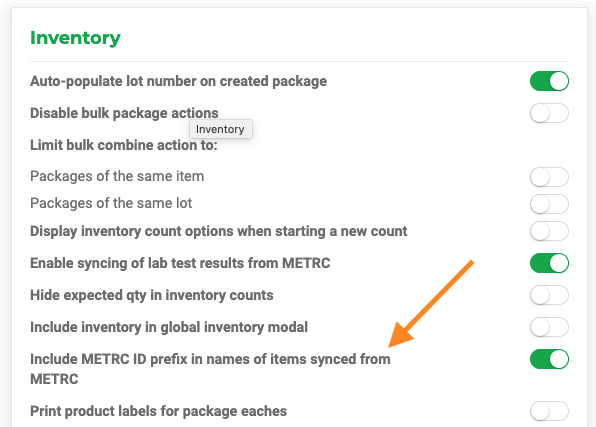
If you want the name of the item to include the prefix, please follow the steps below:
- Click
 Settings.
 - Select Configuration.
- Select the facility to configure.
- Locate Inventory.
- Toggle 'On' Include METRC ID Prefix in names of items synced from METRC.
- Click
 on the top-right corner of the screen.Log in and log out to see the setting updates take effect.
How does it work with QuickBooks Online? click to expand
QuickBooks Online does not accept colon ':' in item names. If you choose your item name to have the prefix, we will replace the colon ':' with a hyphen '-' when you sync the item to QuickBooks Online. , so instead of "M100014:Bulk Flower" we will send "M100014-Bulk Flower" to QuickBooks Online.
How did we do?
Troubleshoot Metrc Sync in Flourish: Overview
Create an External Transfer to Bring Items into METRC
