Item Vendor UOM Conversion
define Item Vendor UOM Conversions to convert an item from a vendor defined unit of measure such as case into the usable unit of measure (each or gram)
It is best practice to always store an item by the usable unit of measure, generally the "each", "gram", or "milliliter." However, inventory is purchased and received from a vendor in a vendor-defined unit of measure. Define this mapping for the product on the item.
Example: RAW Classic King Size Cone sold by the Master Case with 5,600 eaches per case and the Single Box with 1,400 units per box. Cones are used per each in a Bill of Materials to make a preroll.
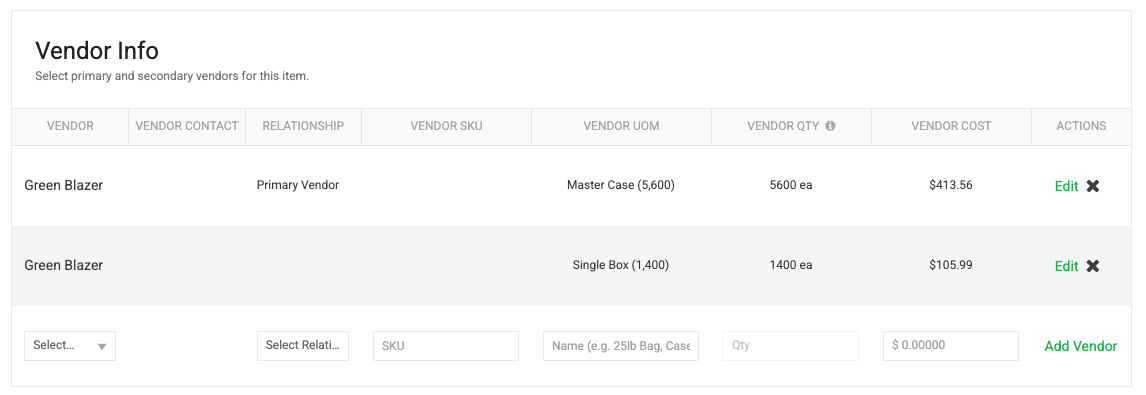
Other examples:
- Box/Case/Master Case of chocolate to grams
- Bags of sugar to grams
- Cartons of coconut oil to ounces
- Bottles of terpenes to milliliters
How to set up vendor units of measure
Pre-Requisite: Set up the vendor(s) and create the item.
- Navigate to the item (Settings > Inventory > Items)
- Scroll to the bottom of the page to see the Vendor Section
- Select a vendor
- Use the "Primary Vendor" relationship to set the default conversion. This is optional.
- Enter the Vendor SKU if you want to cross-reference the vendor's item identifier. This is optional.
- Enter the Vendor UOM's name. This should be brief but descriptive (Box, Case (12), Master Case (5,600), Bottle (2L)). This is required.
- Enter the quantity in the unit of measure that the item is configured for. This is a critical setting. This is required.
- Enter a default cost. This is optional. The actual purchase price is defined on the purchase order.
- Relationships can be added, modified, and removed as desired.
- Ability to define multiple uom conversions across one or more vendors
How did we do?
Set Up Separate Retail and Wholesale Pricing
