Table of Contents
- Setting Up Cannabis Compliance Labels for Capsules, Drinks, Edibles, Tinctures, and Similar Products
Labeling Guide for Dose Based Items (Capsules, Drinks, Edibles, Tinctures, etc.)
Setting Up Cannabis Compliance Labels for Capsules, Drinks, Edibles, Tinctures, and Similar Products. This guide explains how to correctly configure item and package fields used for labeling regulate…
Table of Contents
- Setting Up Cannabis Compliance Labels for Capsules, Drinks, Edibles, Tinctures, and Similar Products
- Setting Up Cannabis Compliance Labels for Capsules, Drinks, Edibles, Tinctures, and Similar Products
Setting Up Cannabis Compliance Labels for Capsules, Drinks, Edibles, Tinctures, and Similar Products
This guide explains how to correctly configure item and package fields used for labeling regulated products such as edibles, capsules, tinctures, beverages, and other dose-based items. The goal is to ensure labels accurately reflect the actual production batch and COA (lab test results), even when real-world outcomes differ from original expectations.
Why This Matters
Labeling must be accurate and compliant. In practice:
- The item defines the standard expected values.
- A production batch may differ from those expectations.
- The package override allows controlled overrides so labels match the real, tested product within the state-approved variances.
Flourish is designed to support this workflow while preserving traceability.
Key Concepts and Terminology
Item: Standard Definitions
The item represents the intended formulation and is where you define default labeling values.
Standard item fields include:
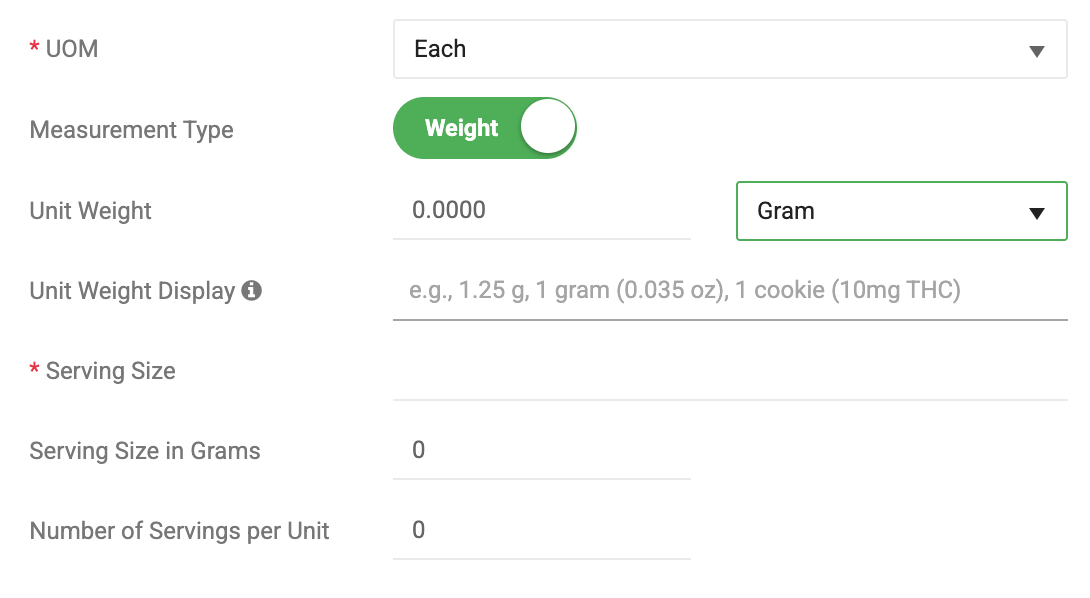
- Unit Weight – Weight of one unit (e.g., 1 capsule, 1 gummy, 1 mL). If you are producing a chocolate bar, the unit weight is the net weight inside the package (the weight of the chocolate bar). Best practice: Define this in grams.
- Serving Size – How many units make up one serving. This is the value you'd print out on the label. It can be 1 or something like 2 Tbsp (32g)
- Serving Size in Grams - Define the serving size in grams for calculations.
- Number of Servings – Total servings per package. This typically is a whole number.
These values act as defaults and are used unless overridden at the package level.
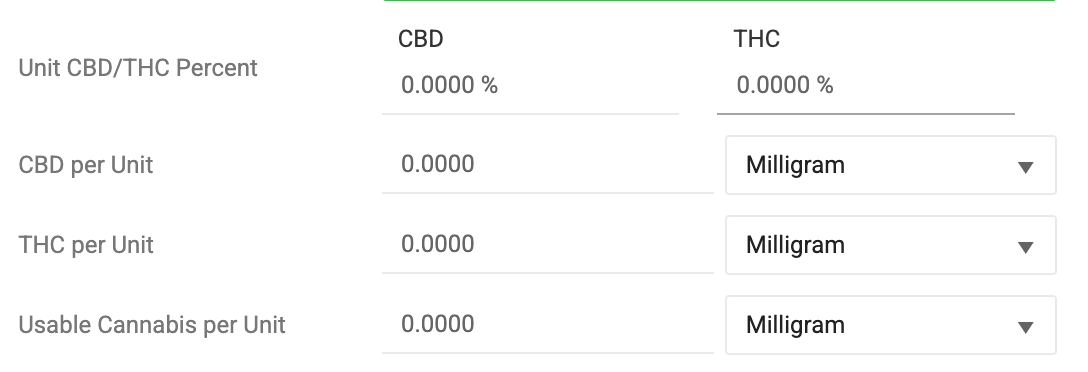
Flourish also has the expected fields for these CBD and THC Values. However, we use the Lab Test Results to dynamically print the actual values.
- Unit CBD/THC Percent – Expected formulated % of each. Required to sync to Metrc in certain states.
- CBD per Unit – Total CBD in the sellable unit. Often defined in Milligrams
- THC per Unit – Total THC in the sellable unit. Often defined in Milligrams
- Usable Cannabis per Unit – Used in purchase limit calculations
Package Attributes: Optional overrides
The package represents the specific produced and tested product. Set any overrides for the package that represents the production batch ahead of splitting it into additional packages for distribution.
At the package level, you may override:
- Unit Weight
- Serving Size in Grams
Overrides should be used when:
- The production batch differs from the expected formulation
- The COA reports values that require adjustment for accurate labeling
Overrides ensure labels reflect what was actually produced and tested, not just what was planned.
Lab Test & COA (Certificate of Analysis)
The testing lab verified results, such as those below, and submits them to the state system, where applicable. The lab will provide an official Certificate of Analysis (COA).
- Total CBD, THC, THCa, Delta‑9 THC, and other cannabinoids and terpenes
- Potency expressed as mg/g or %
- Typically the COA or state-synced results also have a mg/serving or mg/package value
COA values must be mapped correctly to Flourish’s standard fields so label calculations are correct.
Standard Label Calculations
Flourish uses unit weight, serving size, and lab potency to calculate common label values.
THC per Package
Formula: THC % x 10 x Unit Weight in grams.
Example: 0.0414 x 10 x 24.4
Calculated using:
- THC %
- The Unit Weight defined on the package, or if not populated the Unit Weight defined on the item
THC per Serving
Represents the mg of THC in one serving of the sellable unit.
Formula: THC % x 10 x Serving Size in grams.
Example: 0.0414 x 10 x 22.2
Source:
- THC %
- The Serving Size in Grams defined on the package, or if not populated the Serving Size in Grams on the item
THC mg/g
Represents milligrams of THC per gram of product.
Formula: THC % x 10
Example: 0.0414 x 10
Source:
- % THC
- Unit Weight
THC %
Represents THC as a percentage of total product weight.
Source:
- Directly from the COA and mapped to the standard name within Flourish's Lab Test Result screen
Mapping COA Results to Standard Fields
If you operate in a state using BioTrack or Metrc, the COA data set will sync from the state system into Flourish. If data is missing or you operate in a state without a state system, simply upload the COA. Flourish will read it and populate all available fields. If Flourish doesn't recognize the COA format, you may manually enter the result set into Flourish.
When entering or reviewing COA results:
- Confirm whether potency is reported as mg/g or %.
- Map the COA values to the appropriate standard cannabinoid and terpene fields. Flourish will remember the mapping and automate this once a value is mapped for the first time.
- Verify unit weight and serving size reflect the tested batch, not just the item default.
- Review calculated label outputs (THC per package, THC per serving) with a test print if needed to verify they match the COA.
Example COA Presentation
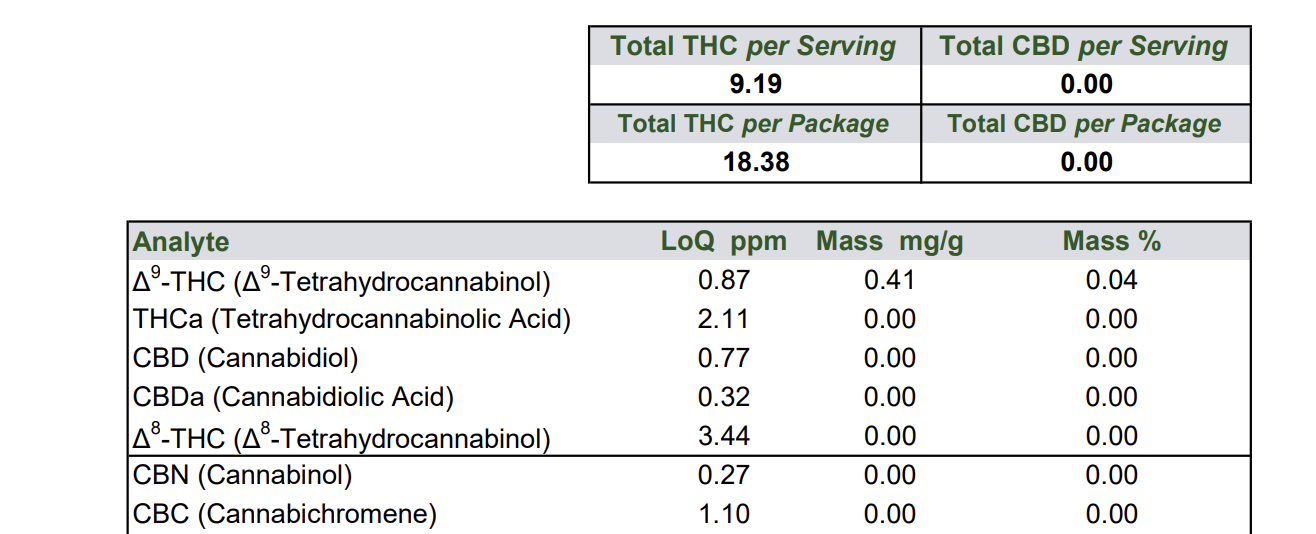
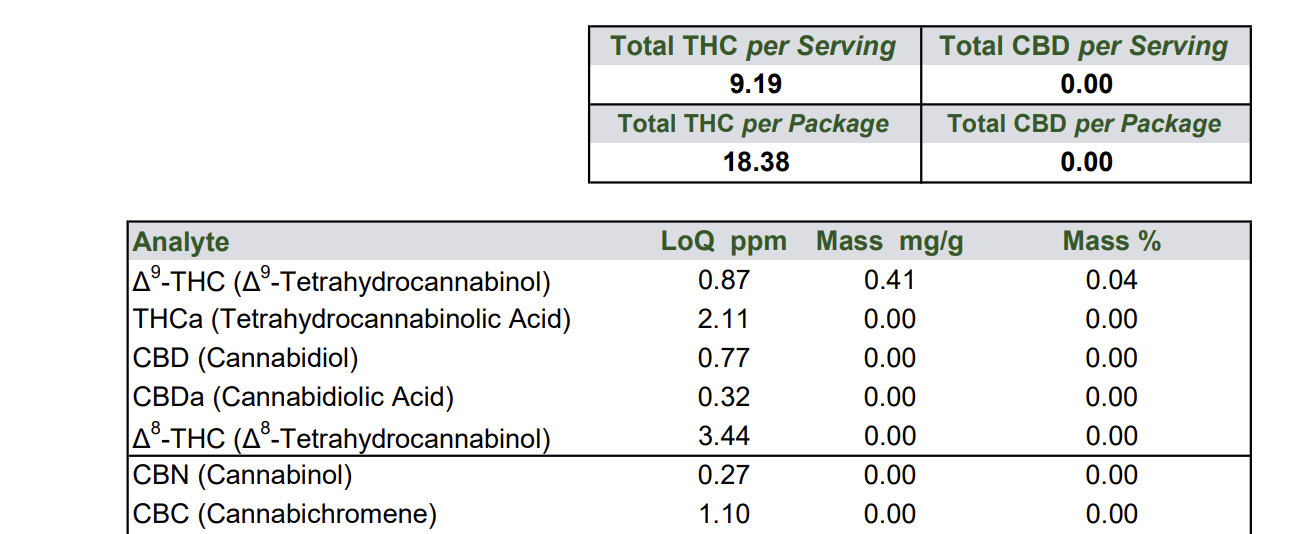
This is a COA for an edible. The edible has 2 servings in the package. Each serving size is 22.2 grams. The unit size is 44.4 grams.
Total THC per Serving = 0.0414 x 10 x 22.2 = 9.19 mg
Total THC per Package = 0.0414 x 10 x 22.2 x 2 = 18.38 mg
Map Metrc synced results to the Flourish standard result set
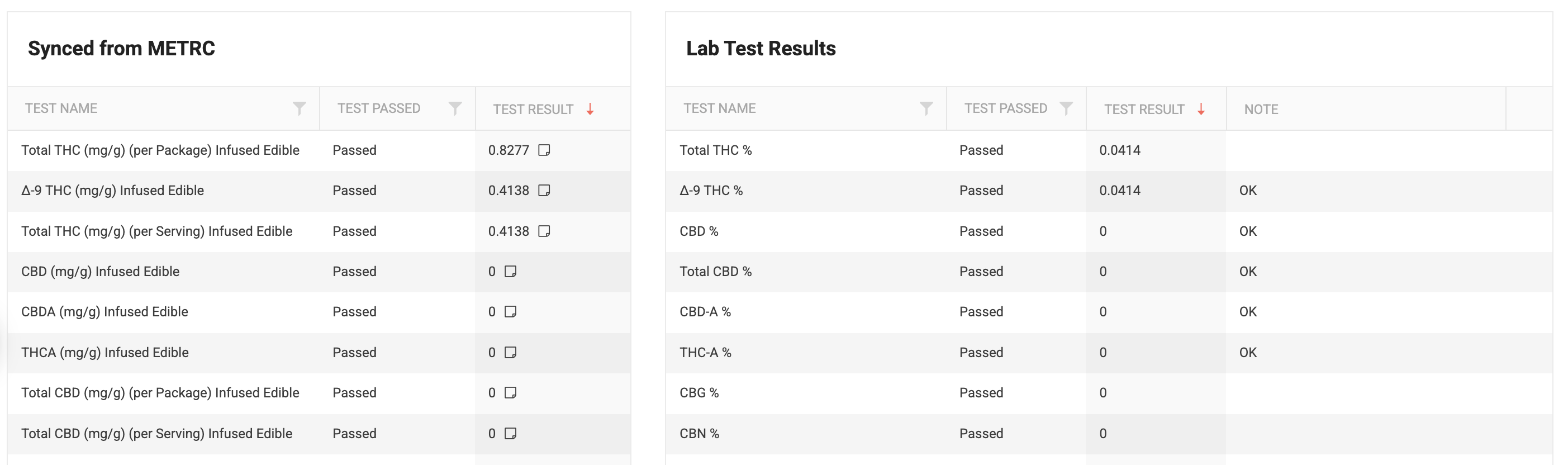
- Map the Delta-9 THC (mg/g) Infused Edible field from Metrc to the Delta-9 THC % field in Flourish
- Map the Total THC mg/g (per Serving) Infused Edible from Metrc to the Total THC% field in Flourish. Double check this field!
Error Example 1
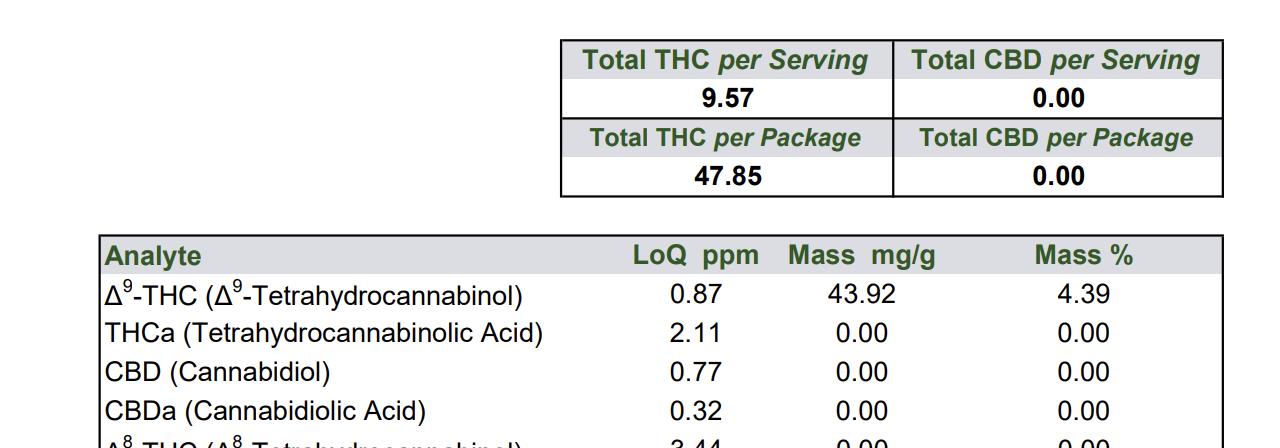
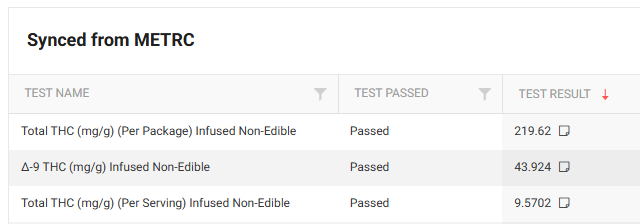
Error Example 2
Example for a Formulated Item
Item: Infused Drink - 50mg
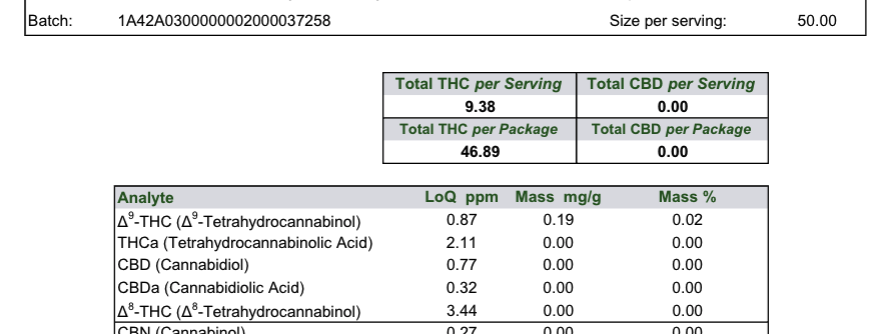
This should have a Serving Size in Grams of 50 and a Number of Servings per Unit of 5 to calculate the mg of THC. The COA reports in milligrams per gram, as shown here:
This is what syncs into Flourish from Metrc: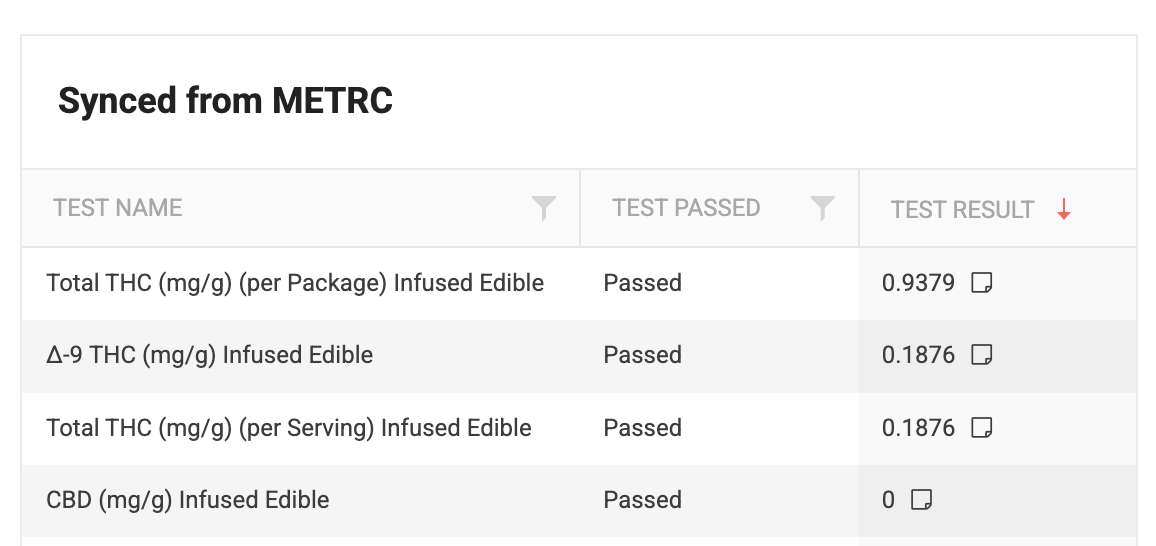
Formula for the labeling and mapping to the Lab Test Results in Flourish:
- COA Size per Serving = 50
- COA Mass mg/g for Delta 9 THC = 0.19
- Total THC (mg/g) (per Package) Infused Edible = 0.9379
- Total THC (mg/g) (per Serving) Infused Edible = 0.1876 is mapped to Total THC %
- Total THC (mg/g) (per Serving) Infused Edible = 0.1876 is mapped to Δ-9 THC %
- Total THC per Serving = 50 * 0.1876 = 9.38
- Total THC per Package = 5 x 9.38 = 46.89
Edible Example for Chews / Gummies
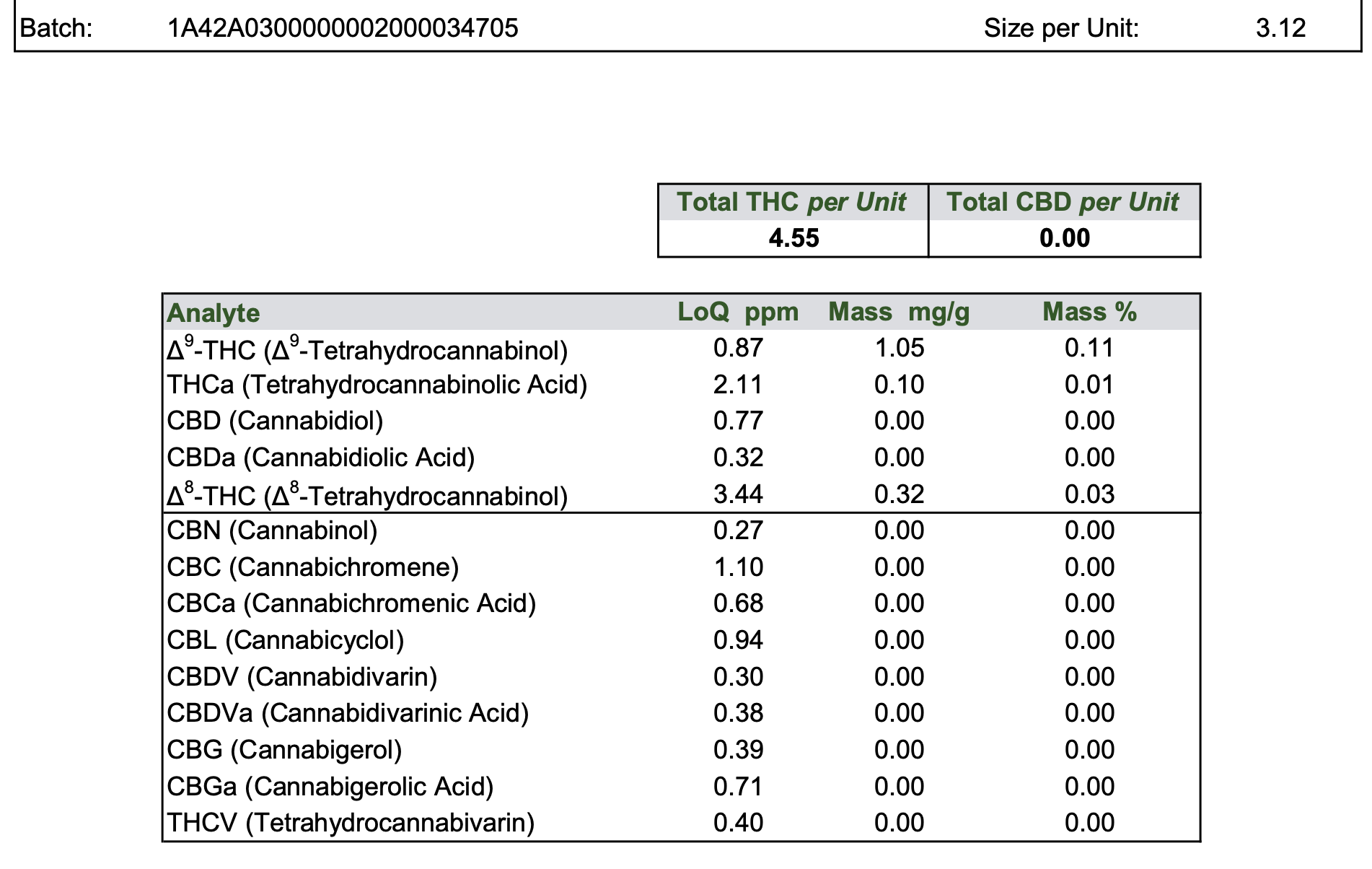
- Size per Unit: 3.12g (one piece)
- Total THC per Unit: 4.55 mg
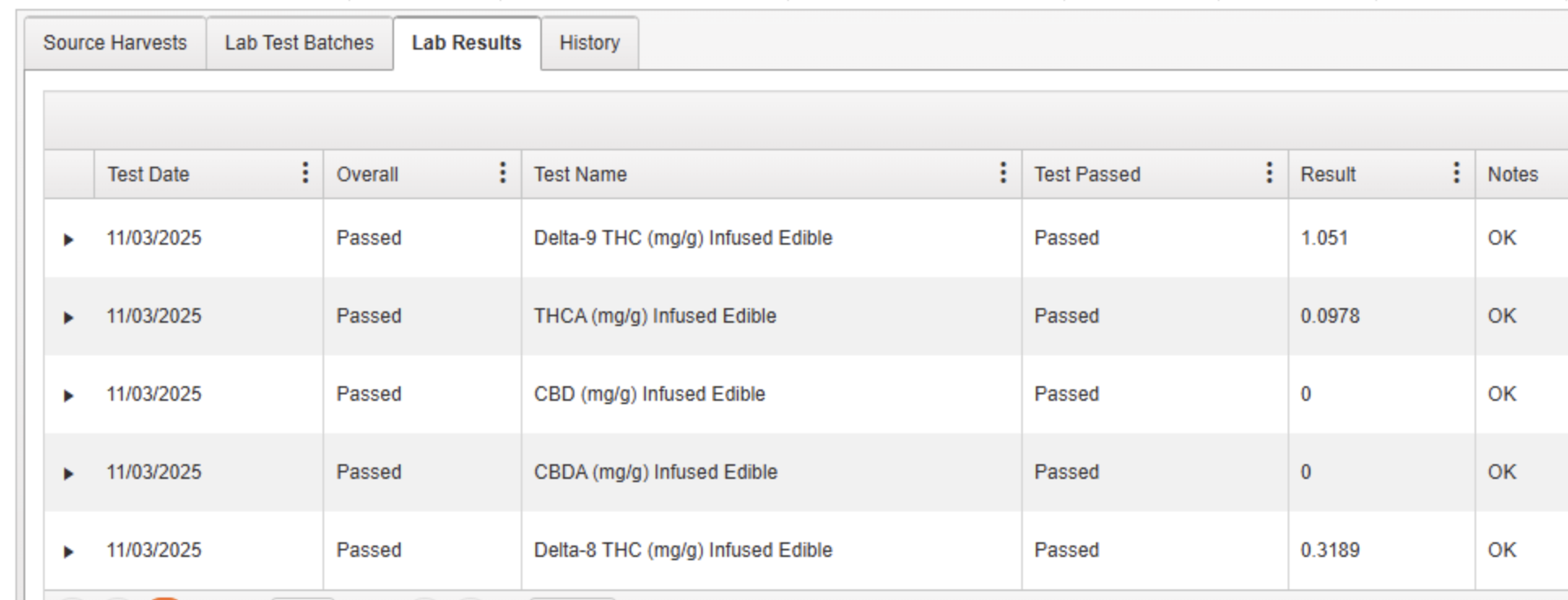
- Delta 9 THC: 1.05 mg/g
- Delta 8 THC: 0.32 mg/g
- THCa: 0.10 mg/g
Flourish Lab Test Fields:
Total THC = (THCa × 0.877) + Delta-9 + Delta-8
          Total THC = (0.10 × 0.877) + 1.05 + 0.32
          Total THC = 0.0877 + 1.05 + 0.32
          Total THC = 1.4577 mg/g
          Total THC per Unit = 1.4577 mg/g × 3.12g = 4.55 mg per unit

          Enter this into Flourish:
          Total THC %: 0.1456%
          Serving size: 3.12g
          Label calc: 0.1456% × 3120mg = 4.54 mg per piece

          Map the Delta-9, Delta-8, and THCa values directly to the lab results. They are listed in the correct mg/g concentrations within Metrc.
When to Override Item Defaults on a Package
Use package-level overrides when:
- Individual unit weight varies from the item standard outside of an allowed variance
- COA results require recalculation of servings or total weight
Do not update the item unless the change applies to all future production.
Label Maker
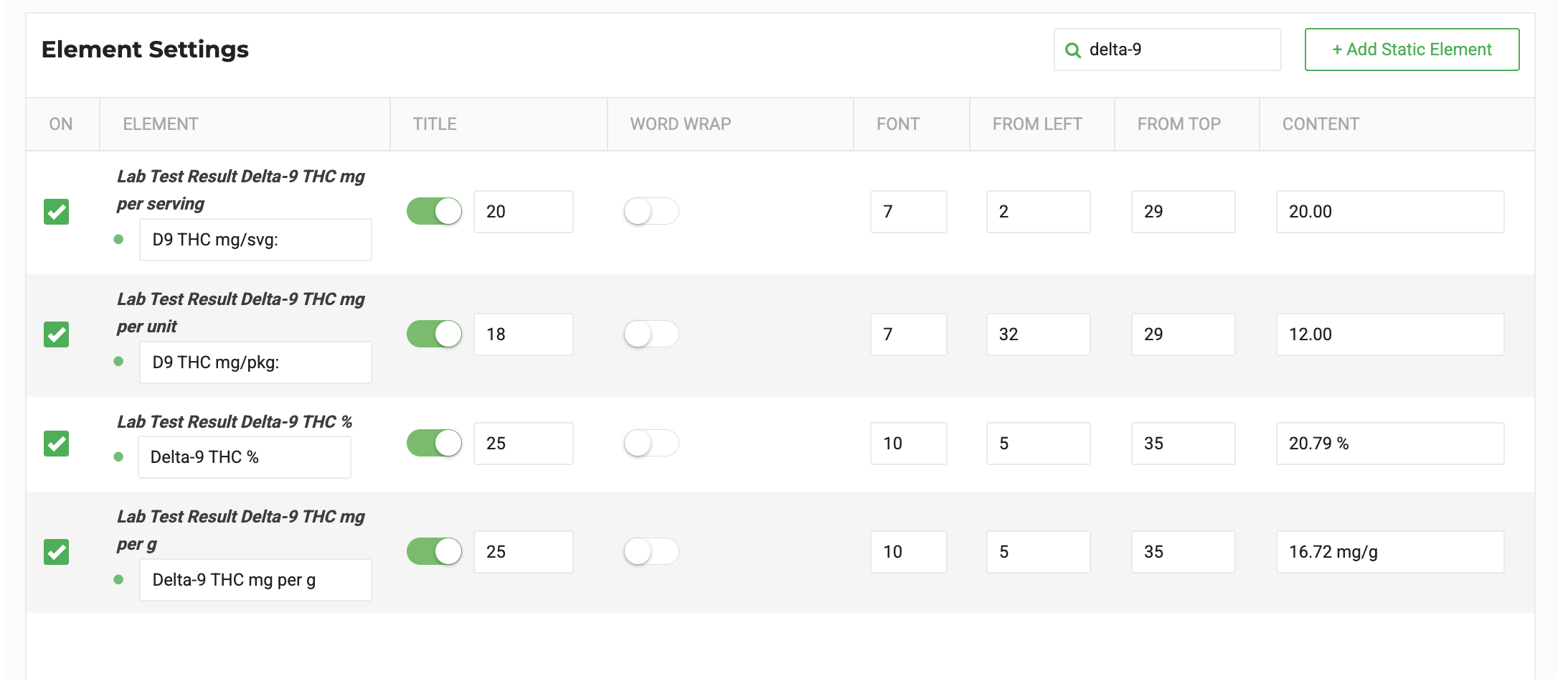
Flourish has fields for all standard cannabinoids and terpenes, which follow this pattern:
- Lab Test Result Delta-9 THC %
- Lab Test Result Delta-9 THC mg per serving
- Lab Test Result Delta-9 THC mg per unit (This is "Per Package" since Unit represents the net weight of the sellable packaged unit)
- Lab Test Result Delta-9 THC mg per g
Tips:
- Use static text for lines
- Update the title as needed
- Use a placeholder
- Use Unit Weight Display on the Item to override what displays in the Unit Weight field
Configuring Your Label Template
For a full overview of label types, data elements, and template settings, see the Flourish Label Maker - Configure Labels guide.
Example Scenario for Override
Item (Standard Definition):
- Unit weight: 1.0 g per capsule
- Serving size: 1 capsule
- Number of servings: 30
- Expected Totals: 300mg of THC per Package
Actual Production Batch:
- Average unit weight: 1.22 g per capsule
- COA potency: 10 mg THC/g
Package Override:
Result:
- THC per capsule = 12.2 mg
- THC per package = 366 mg
Best Practices
- Always review COA results before finalizing labels
- Do a test print to check the lable before printing all product labels
- Use item fields for formulation intent, package overrides where required
How did we do?
Installing a Unicode-Supported Font on Zebra Printers
