Edit Expected Flower/Harvest Date on the Group View
Purpose. Use the Group view in Grow to update the expected flower date on Vegetative groups or the expected harvest date on Flowering groups. Keeping these dates current ensures accurate crop plannin…
Purpose
Use the Group view in Grow to update the expected flower date on Vegetative groups or the expected harvest date on Flowering groups. Keeping these dates current ensures accurate crop planning and timeline visibility.
Edit the Date
- Click Grow.
- Locate the group.
- Click the Date Picker next to the date you want to edit.
- Select the date.
- Click outside the Date Picker to save.
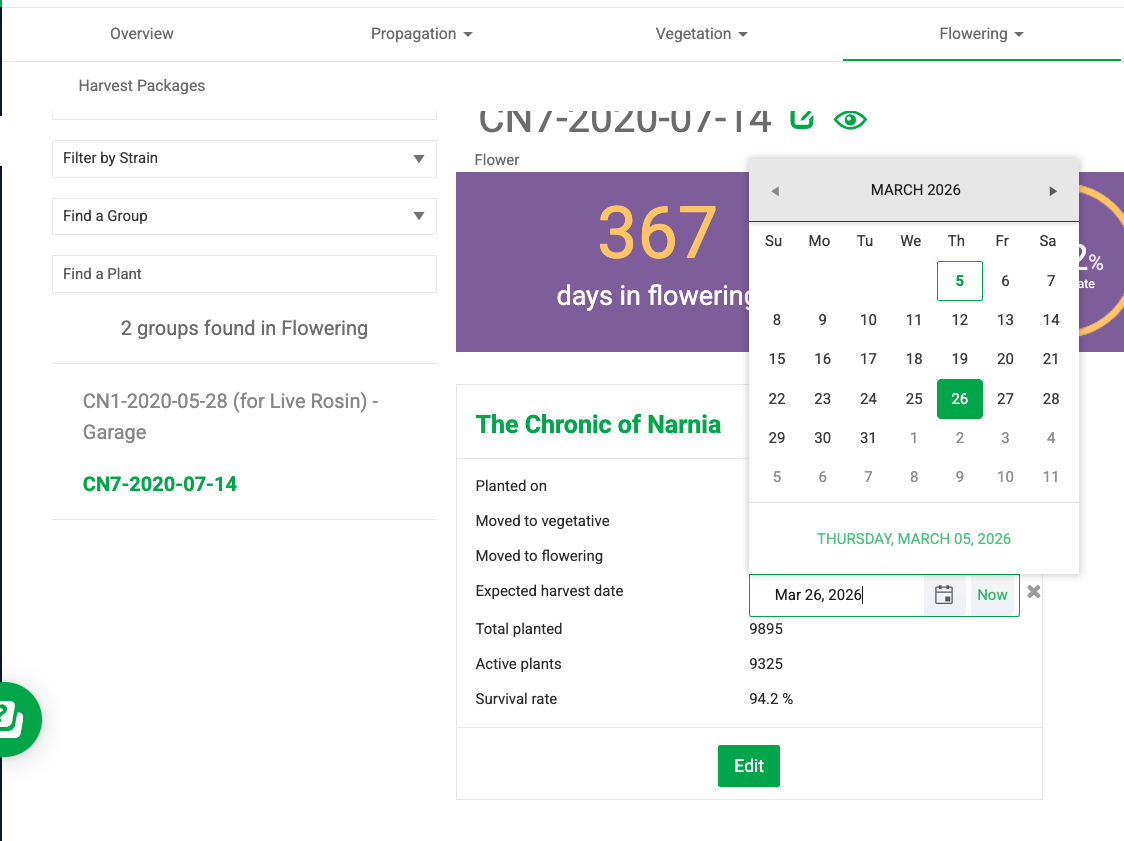
The same steps apply when editing the Expected Flower Date field on a Vegetative group: click the Date Picker next to the field, select the date, and click outside the Date Picker to save.
How did we do?
Print or Reprint Plant Tags
