View Plant Group Stages and Upcoming Harvests on the Grow Calendar
Use the Grow calendar to see each plant group's Clone, Veg, Flower, and Mother stages by room, and spot groups expected to harvest in the next 21 days.
Purpose
The Calendar tab in Grow shows every plant group's history and plan on one timeline, organized by room. Use it to see what's in each room, how long each group has been in its current stage, and what's harvesting in the next few weeks. The calendar is read-only: it shows the dates already recorded on your groups and doesn't change them.
Prerequisites
- Your user role needs access to the calendar under Admin > User Roles > Grow.
- Groups need stage dates and areas recorded to appear in the right place. To set or correct a group's expected harvest date, see Edit Expected Flower/Harvest Date on the Group View.
Open the Calendar
- Select Grow from the left navigation.
- Click the Calendar tab.
- Choose Day, Week, or Month to change the time range shown.
- Click any bar to open that plant group.
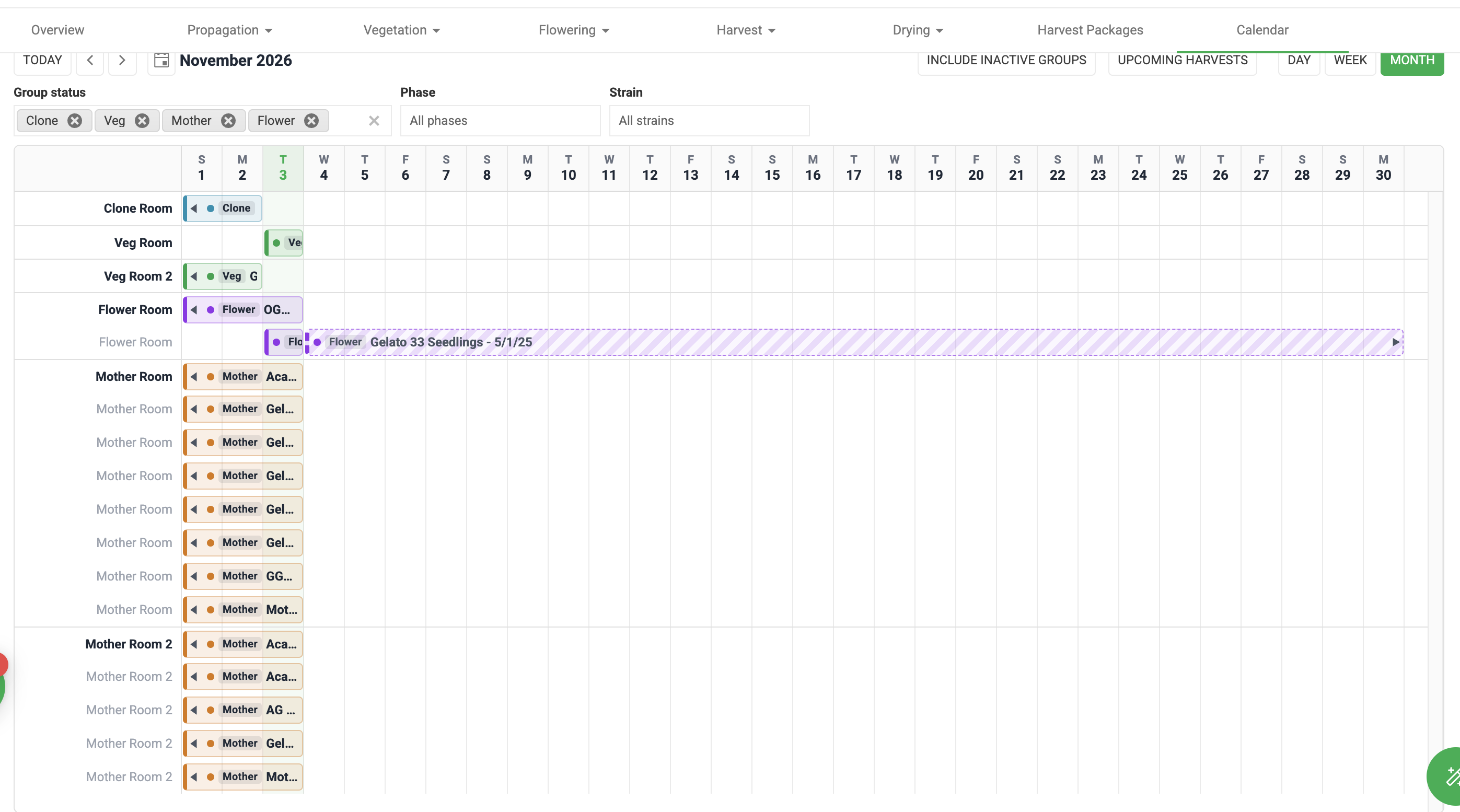
Read the Calendar
- Each row is a room. A group appears in the room it was in during each stage. Rooms are listed in growth order: rooms with Clone groups first, then Veg, Flower, and Mother. A room holding groups in more than one stage is placed by its earliest stage, and rooms in the same stage are sorted by name.
- Each bar is one stage of one group, colored by stage. A group that has moved through several stages shows one bar per stage, one after another with no gaps. For example, a group moved from Clone to Veg on October 15 has a Clone bar that ends October 14 in the propagation room and a Veg bar that starts October 15 in the Veg room.
- A stage still in progress runs to today.
- Mother groups show a single open-ended bar.
- Groups in Clone or Veg are drawn only up to their current stage, even if a later date is already entered on the group.
Calendar stage | Starts | Ends |
Clone | The day the group was planted | The day before it moved to Veg |
Veg | The day it moved to Veg | The day before it moved to Flower |
Flower | The day it moved to Flower | The harvest date, or today if not yet harvested |
Mother | The day it became a mother group | Open-ended |
Projected harvest bars
For a group in Flower that hasn't been harvested, a striped bar continues on the same row as its Flower bar, from tomorrow to the group's expected harvest date. Its length depends only on that date, so a group due tomorrow shows a one-day projection.
- No expected harvest date, or an expected harvest date of today or earlier: no projected bar.
- Harvested groups: the Flower bar ends on the harvest date and nothing is projected. There is no Drying bar.
Filter the Calendar
Filter | What it does |
Upcoming harvests | Shows only groups with an expected harvest date in the next 21 days. Use it to plan harvest crews and drying space. |
Group status | Chooses which groups load. A group with a status of harvested, drying, or processing still shows the Clone, Veg, and Flower bars it went through. |
Phase | Chooses which bars are shown. Select one stage, such as Flower, to see only those bars. |
Strain | Shows only groups of the selected strain. |
Include inactive groups | Also shows groups that haven't been updated in more than 180 days. These are hidden by default so abandoned groups don't look like they're still growing. |
Troubleshooting
If you see | Do this |
The same group in two rooms | This is expected. The group appears once per stage, in the room where that stage happened. Use the Phase filter to see one stage. |
Fewer groups than you expect | Groups not updated in more than 180 days are hidden. Turn on Include inactive groups, and check the Group status filter. |
No projected harvest bar on a flowering group | The group has no expected harvest date, or the date is today or in the past. Update it on the group. See Edit Expected Flower/Harvest Date on the Group View. |
A bar's dates are wrong | The calendar shows the dates recorded on the group, and you can't drag bars to change them. Open the group by clicking the bar and correct the dates there. |
How did we do?
Print or Reprint Plant Tags
Edit Expected Flower/Harvest Date on the Group View
