Re-Sync an Out-of-Sync Strain in Metrc
Learn how to re-sync out-of-sync strains in Flourish to Metrc. Navigate to Manage Settings > Inventory > Strains, find the strain, click Compliance, then Sync Now to resolve sync issues.
You can't create plants or packages with a strain that's out of sync with Metrc. Retry the strain sync from its Compliance tab.
Metrc facilities only.
Common Causes
- The Metrc account connected to Flourish doesn't have permission to create or edit strains.
- The strain name or details don't meet Metrc's rules, for example a duplicate name.
- The strain was deactivated in Metrc.
- Metrc was slow or unavailable when Flourish tried to sync.
Re-Sync the Strain
- Click Settings.
- Select Inventory > Strains > All Strains.
- Search for the strain and click its name.
- Click the Compliance tab.
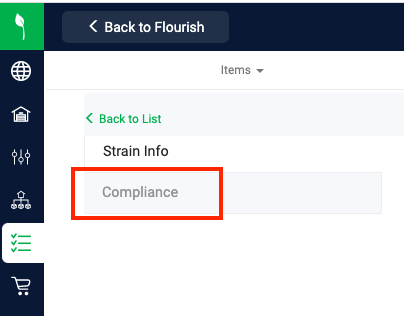
- Find the facility that shows Out of Sync and click the pencil icon in the Synced? column.
- Click Sync Now.
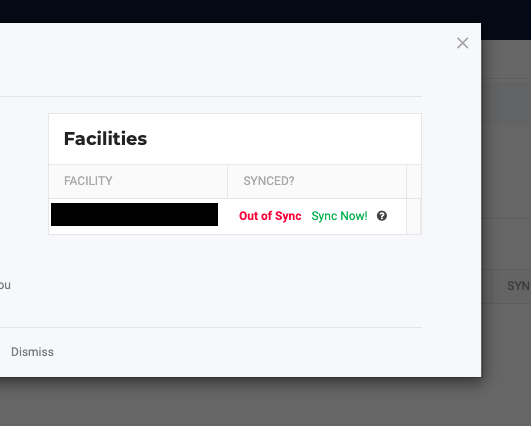
When the sync succeeds, the Synced? column shows In Sync.
If It Stays Out of Sync
- Click the ? icon next to the status to read the Metrc error.
- Fix what the error describes, for example the strain name or a Metrc permission. If the strain was deactivated in Metrc, reactivate it there.
- Click Sync Now again.
Still stuck? Contact Flourish Support with the strain name and facility name. See Support.
How did we do?
Rename a Harvest in Metrc
Retry Sync for Out-of-Sync Plants in Metrc
