Table of Contents
Retry Sync for Out-of-Sync Plants in Metrc
Resend failed promote and move actions to Metrc for out-of-sync Vegetation, Mother, and Flowering plants using Retry Sync in the Grow module.
Table of Contents
Metrc sometimes fails to record large plant moves, such as promoting many immature plants to Vegetation or moving a big group to a new area. When that happens, the plants show as out of sync in Flourish. Use Retry Sync to send the same action to Metrc again.
Metrc facilities only. For immature plant batches, see Fix an Out-of-Sync Plant Batch in Metrc. For other records, see Metrc Out of Sync: Troubleshoot Packages, Items, Plants & Harvests.
What You Can Retry
- Tagging plants and promoting them from an immature plant batch to Vegetation, Mother, or Flowering
- Moving plants to a new area in the same stage
- Moving plants to a new area in a different stage
Retry Sync is available on the plants views: Grow > Vegetation > Veg Plants, Grow > Vegetation > Mother Plants, and Grow > Flowering > Flowering Plants. California has no Vegetation or Mother plants view.
Retry the Sync
- Click Grow and open the plants view for the stage, for example, Vegetation > Veg Plants.
- Filter the list to the plants that went out of sync together. For example, if a group move failed, filter to that group.
- Select the out-of-sync plants. Ctrl/Cmd + click selects individual rows, and Shift + click selects a range.
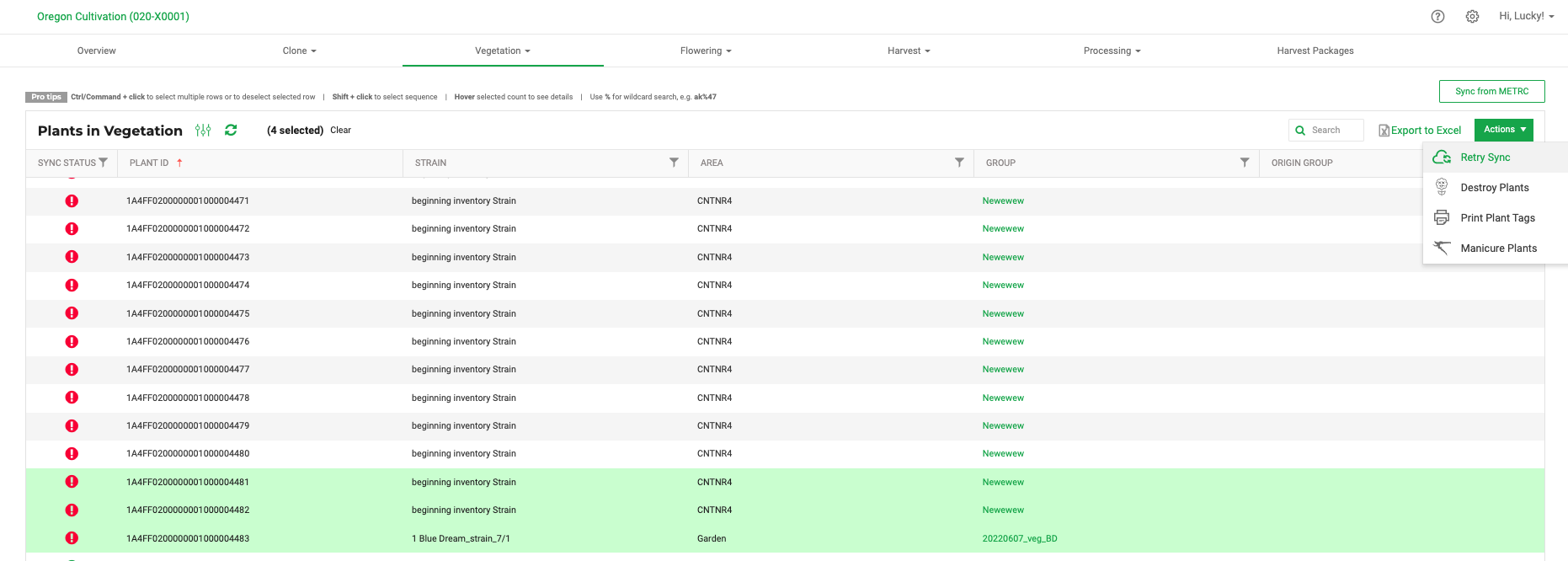
- Click Actions > Retry Sync.

Flourish queues the plants and resends the action that failed. This can take a few seconds or longer, depending on how Metrc is responding. Refresh the list to see the latest status.
Only select plants that went out of sync at the same time for the same reason. Retry Sync resends the original action, so mixing plants from different failures can fail again.
If the Retry Fails
- Click the plant's sync status icon to read the Metrc error.
- Fix the cause, for example a Metrc permission, an area Metrc doesn't recognize, or a tag already in use.
- Retry again. If it still fails, contact Flourish Support with the plant IDs and facility name. See Support.
How did we do?
Re-Sync an Out-of-Sync Strain in Metrc
Fix an Out-of-Sync Plant Batch in Metrc
