New Mexico NMS2S: Create Plants and Assign State Plant IDs in Flourish
Move NMS2S state plant IDs onto Flourish plant records by copy and paste, so Flourish prints compliant New Mexico plant tags on your existing labels.
NMS2S mints a state plant ID for every individual plant at stage change, and New Mexico has no plant API. Those IDs must be reflected in your Flourish plant records, as the physical plant tag is printed by Flourish. This feature moves them across by copy and paste.
Why the IDs have to come across
NMS2S issues the plant IDs and then does very little with them. It has no export, and its tag printing does not produce a usable plant tag. So the state hands you an identifier that you cannot easily pull from the system and cannot put on a plant.
Bringing the IDs into Flourish is what makes them usable:
- Plant tags print. Flourish already prints plant labels on your existing tag stock and printer.
- Your cultivation records stay intact. The state migration stripped room assignment, life stage, and grouping, and set birth dates to the transplant date. Flourish holds the real picture, including where a plant is, what stage it is in, which batch it came from, and when it was actually cut.
- Analytics survive. Batch and cohort tracking, plant counts, survival, and harvest attribution all run off Flourish records. None of that exists state-side.
What it does
Flourish adopts the state IDs as its own plant IDs. After the swap, the Flourish plant ID is the NMS2S ID, so your existing plant labels print the state ID without any template change or new label field.
Plant genealogy, harvest history, and waste records automatically follow the swap. The original Flourish-generated ID is retained internally.
This is not sync. It does not reduce dual entry. You still promote every plant in NMS2S by hand. What it does is make Flourish's records match the state's records and enable compliant tag printing.
Plants and packages work differently
These two are easy to confuse, and they are opposites:
Record | Where the NMS2S ID goes |
Plants | The state ID replaces the Flourish plant ID. Existing plant labels print it with no change. |
Packages | The state ID goes in Reference Field 1 alongside the Flourish package ID. The package label is duplicated and pointed at that field. |
Creating Plants
Starting with Clones or Seeds in Inventory
In NMS2S:
- Find the source tag
- Move to a production room (Example: Clone Room)
- Navigate to the production room
- Find the tag. The tag will display as a plant batch
- Select the action "Change Stage"
- Enter the quantity to promote and the stage to promote them to
- Click OK
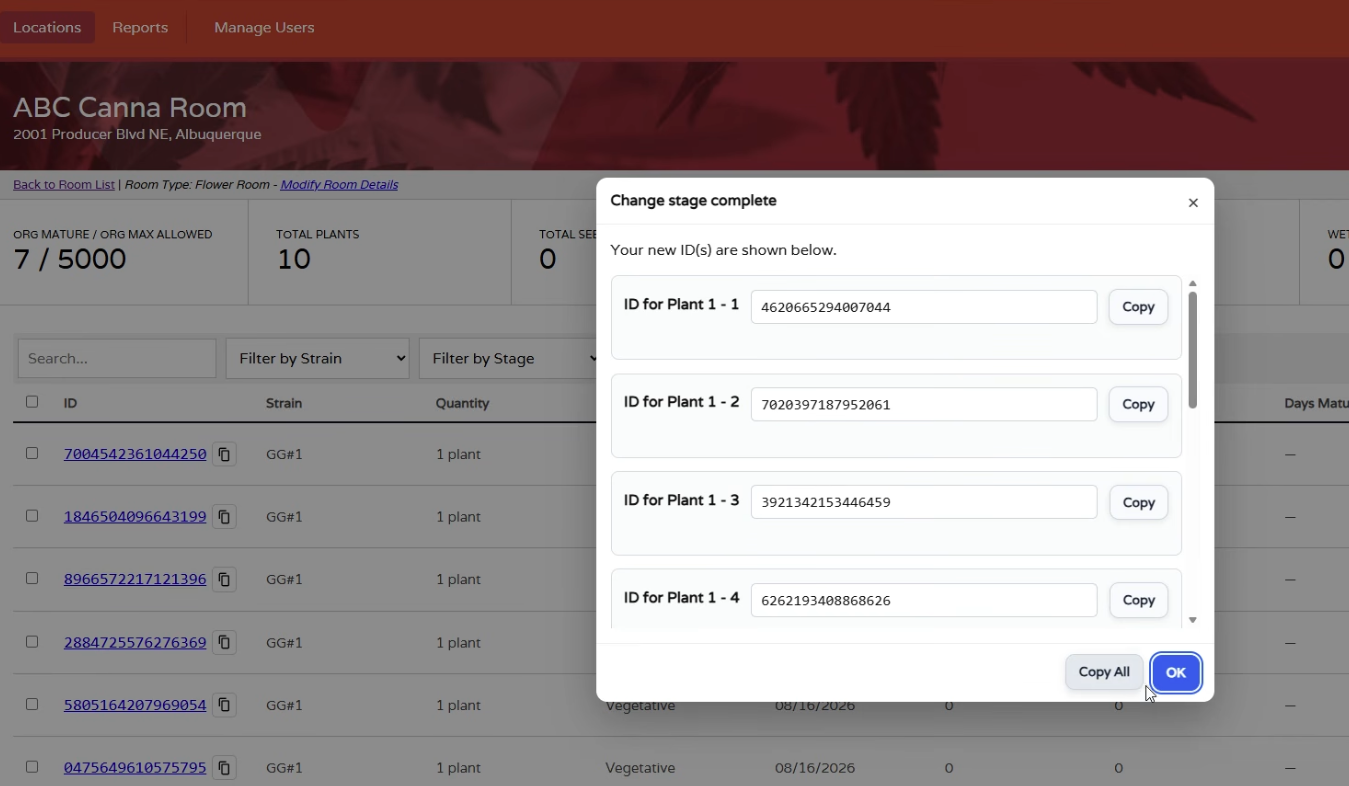
- CRITICAL STEP: Click "Copy All" to save the generated plant IDs
In Flourish:
- If the group of cuttings is already created, skip to step 3
- Follow the prompts to create plants from the designated package. This will create a group of plants that aligns with the plant batch.
- Choose the number of plants to promote. Either split the group or prompt all or part of the group to Veg
Before you start: do not dismiss the state's ID modal
This is the one step that cannot be recovered easily.
When you change stage in NMS2S, the state shows the new plant IDs in a Change stage complete modal. That modal is dismissible, and the portal has no export and no print. If you click OK without copying, the mapping between your plants and their state IDs is gone, and recovering it means looking up plants one at a time.
Always click Copy All before OK. Build this into training for anyone who promotes plants.
The workflow
- Create the plants in Flourish with the correct counts, into a plant group. This is your existing flow, unchanged.
- Change the stage in NMS2S. The state mints one ID per plant and displays them in the Change stage complete modal.
- Click Copy All, then OK.
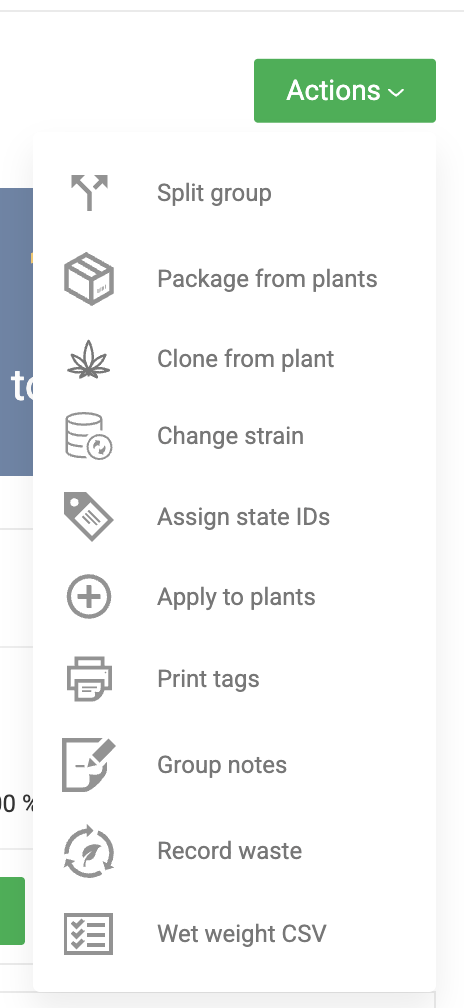
- In Flourish, go to the plant group and choose Action → Assign State IDs.
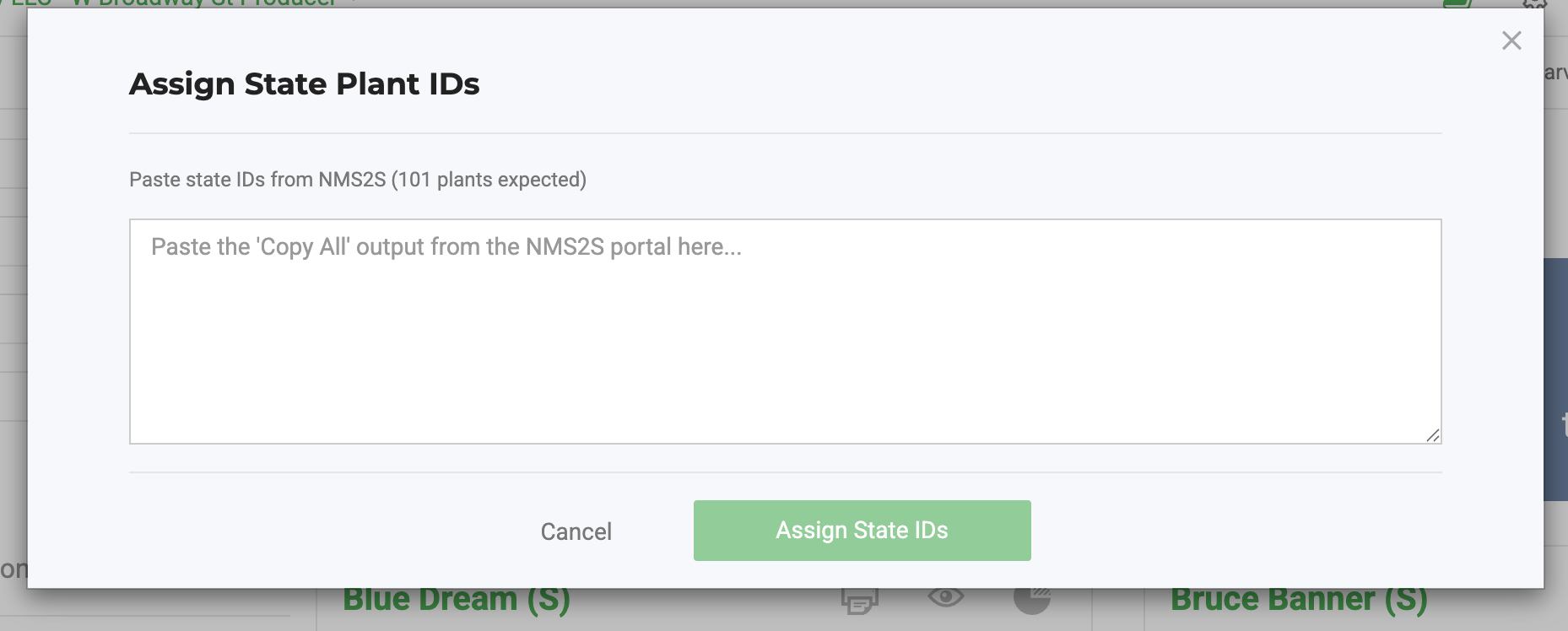
- Paste the copied text into the box. Flourish parses the IDs out of it.
- Review the side-by-side grid. Your current Flourish plant ID next to the incoming state ID, in the group's display order.
- Confirm. Flourish swaps the IDs in a single transaction.
- Print plant tags as you normally would.
Paste directly, never through a spreadsheet
State plant IDs are exactly 16 digits and always carry a leading zero. Excel and Google Sheets will strip that leading zero or convert the value to scientific notation, which silently corrupts every ID in the file.
Paste straight from the state modal into Flourish. Do not route the IDs through a spreadsheet, a CSV, or any intermediate file.
If you want to retain it, please paste into a Google Doc, Word Doc, or Text Pad.
What the paste looks like
Copy All produces one line per plant with a row label, along these lines:
- ID for Plant 1 - 1: 0924370627399950
- ID for Plant 1 - 2: 0924506730801519
Flourish takes the 16-digit number from the end of each line, keeps them in the order pasted, and ignores the labels. You do not need to clean the text up first.
Validation
Flourish checks three things before it will accept the paste:
Check | What happens |
The number of IDs matches the group's plant count | A mismatch in either direction blocks the whole paste. There is no partial assignment — this prevents IDs landing on the wrong plants. |
Every ID is distinct | Duplicates are rejected |
Every ID is exactly 16 digits | Anything else is rejected |
If the count does not match, check whether the Flourish group and the NMS2S promotion actually cover the same plants before re-pasting.
After you confirm
Flourish reports how many IDs were added and how many were assigned. Check those numbers against what you expected, rather than assuming a clean run by re-pasting the same block will report differently than a first pass.
Once a group has state IDs assigned, the Input State IDs action no longer appears for it.
Scale and timing
The action is built for large groups and will handle 1,000 or more plants in a single paste. A cutting batch of several hundred is normal.
Because the swap affects every record associated with those plants at once, run it as a deliberate action rather than in the middle of other heavy plant work at the same facility.
Which stages this covers
Propagation, vegetative, mother, and flower. NMS2S mints IDs per plant at every one of these, including from a seedling or clone group.
How did we do?
New Mexico NMS2S Outbound Invoicing, Shipping, and Wholesale Guide
New Mexico NMS2S Harvest Dual Entry
