Table of Contents
Lock Codes, Adjustment Codes, & Return Reasons
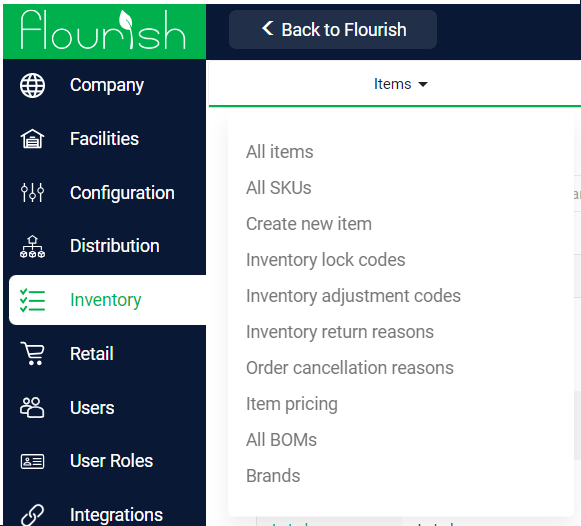
Configure Inventory Lock Codes, Adjustment Codes, Return Reasons, and Order Cancelled Reasons under Manage Settings > Inventory > Items in Flourish.
Table of Contents
Inventory Lock Codes, Inventory Adjustment Codes, Inventory Return Reasons, and Order Cancelled Reasons are all set through Manage Settings>Inventory>Items drop-down menu.
Inventory Lock Codes
The ability to "lock" inventory is essential to enforcing internal and regulatory controls and processes. Locked inventory is not available for creating new inventory or transferring outside the facility. Flourish allows administrators to create custom lock "codes" to lock inventory for specific purposes.
On this screen, you can:
- Create a New Lock Code
- Name it
- Apply rules if applicable
- Disable a Lock Code if it doesn't need to be an available option any longer
- Enable a Lock Code that was previously disabled
- Rename a Lock Code
View more in this detailed help document here.
Inventory Adjustment Codes
For many states, inventory adjustment reasons are defined by the state's track-and-trace system. Flourish allows you to customize, enable/disable, and alias this list of adjustment codes. The state-required adjustment code is always passed to the state system. Adjustment codes justify increasing or decreasing inventory outside of receiving, shipping, or inventory transformation. For more useful information on how to create a new Inventory Adjustment Code, see the helpdoc on Inventory Adjustment Codes
Attributes:
- Enable/Disable: Make the adjustment code available to use.
- Adjustment Type:
- Batch: Used to adjust plant batches (cultivation only)
- Package: Used to adjust the package quantity (cannabis)
- Inventory: Used to adjust inventory quantities not in a package (non-cannabis)
- Reason Code: This is displayed in the prompt for users to choose from a pick list when adjusting inventory
- Reason Code Abbreviation: An abbreviation for the code. This is currently only used for reporting.
- Description: Opportunity to describe the note for an admin to refer back to as needed.
Package and Inventory adjustment codes also have:
- Requires Comment?: users must enter a comment when they pick this code to adjust inventory.
- Min Length: the minimum number of characters that comment must have. Leave it blank to require any non-blank comment.
For setup steps and how state-mapped and system codes behave, see Require a Comment on an Adjustment Code.

Return Reason Codes
These reason codes are used when the destination rejects a product shipped out. While the reason codes are used when you reject a package from an outbound, you can create different reason codes from the Manage Settings>Inventory>Items>Inventory Return Reasons. On this screen, you can:
- Create a New Return Reason
- Disable a Return Reason if it doesn't need to be an available option any longer
- Enable a Return Reason that was previously disabled
- Rename a Return Reason
How did we do?
Tag Items and Facilities to Control Inventory Availability
Managing Inventory Lock Codes
