Table of Contents
Retail Return Reason Codes
Create, disable, and enable the return reasons staff select when processing a return in Retail POS, and require comments for reasons that need more context.
Table of Contents
Purpose
Use Retail Return Reason Codes to guide staff through a consistent return flow in POS, standardize return reasons across all locations, and generate actionable reporting on product quality, customer experience, and operations.
Return reasons apply to all facilities under the company.
Prerequisites
You must have permission to manage Retail settings.
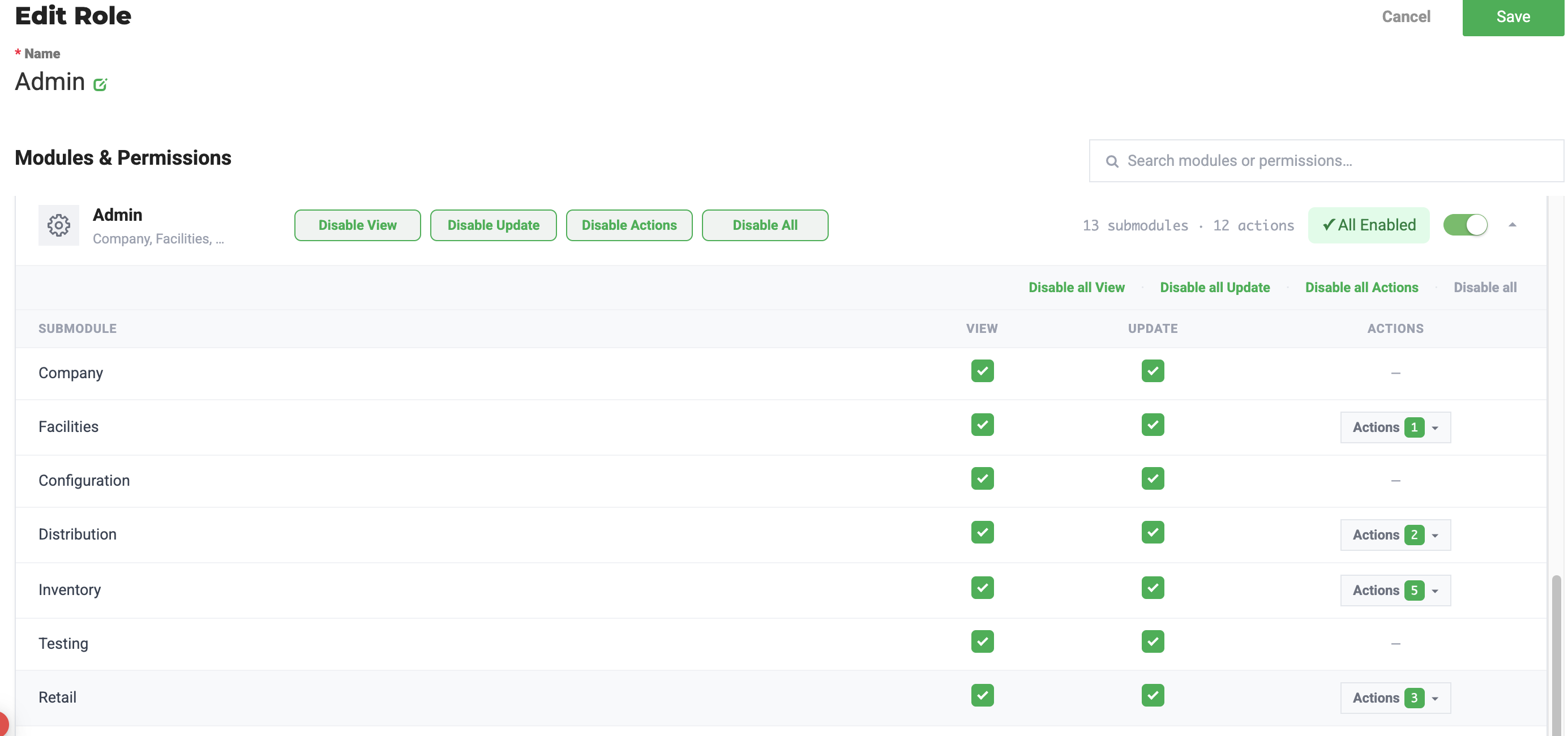
- Click
 Settings.
 - Select User Roles.
- Make sure to select the facility you need.
- Click on Configure next to the role.
- Locate the Admin card
- On the Retail line, ensure the 'View' and 'Update' toggles ON.
- Click
 .
.
Manage return reasons
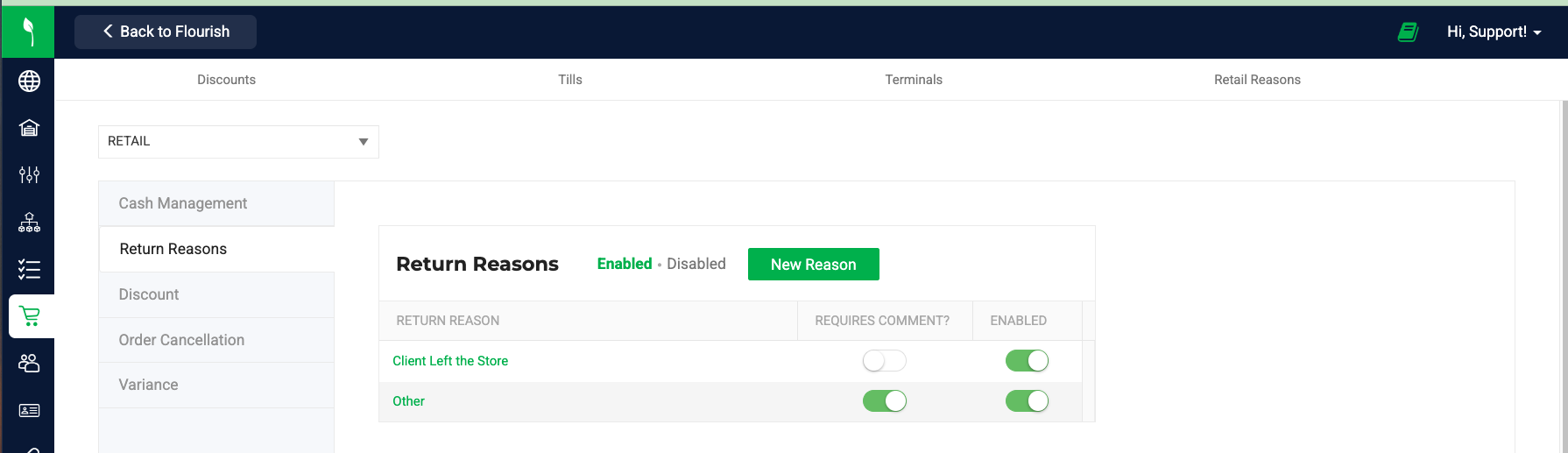
- Navigate to Settings.
- Select Retail.
- Select Retail Reasons.
- Open the Return Reasons tab. Flourish manages the Return Reasons at the Company Level, so any change you make is available regardless of the Facility selection at the top.
- The default Return Reason is Other.
Create a New Return Reasons
- Click New Reason.
- Enter the Return Reason name.
- Enable Requires Comment if a comment should be mandatory when this reason is selected.
- Ensure the reason is Enabled.
- Save the changes.
Turn Off a Return Reason
- Locate the return reason in the list.
- Toggle Enabled on or off.
- Disabled reasons do not appear in POS.
Enable a Return Reason
- Locate the return reason in the Disabled list.
- Toggle Enabled on.
Process a Return in POS
- Open a completed order in POS.
- Click the Return button in the cart.
- Select the item to return.
- Select a Reason from the Reason for Return dropdown.
- Enter a comment if required by the selected reason.
- Select the refund payment method.
- Complete the Return.
Example Return Reasons
We recommend groupding the codes and aligning them to common return reasons. This will best support analytics.
- Customer Experience - Adverse Reaction
- Customer Experience - Did Not Like
- Customer Experience - Potential Contamination
- Customer Experience - Strong/Harsh
- Customer Experience - Weak
- Damage or malfunction - Battery
- Damage or malfunction - Clogged/Leak
- Order Processing - Discount/Pay Issue
- Order Processing - Technical Glitch
- Order Processing - Wrong Product
- Other
- Product Quality - Appearance/Consistency
- Product Quality - Dry Flower
- Product Quality - Empty Package
- Product Quality - Fill/Weight or Small Buds
- Product Quality - Seeds/Stems
- Product Quality - Taste/Aroma
Reporting and analytics behavior
- Each retail return stores the selected return reason.
- Return reason data is consistent across all company facilities.
- Required comments add context to return reason data when enabled.
- Return reasons support analysis of product quality issues, customer experience trends, and operational errors.
- Reporting accuracy depends on selecting the most appropriate return reason during the POS return flow.
How did we do?
Flourish Retail: POS and Web Platform Functions
Track Dispensary Sales with Till Report
