Table of Contents
Create Multiple Plant Batches at Once (Metrc)
Metrc facilities can create several plant batches, across one or more strains and origin plants, in one step. Enter shared details once, add sets, and sync.
Table of Contents
Create several Metrc plant batches in one step instead of one at a time. Enter the area, group, and plant date once, then add a set of batches for each origin plant or strain. Flourish creates every batch and plant together and syncs them to Metrc.
Use this when you are cutting many batches in one session, for example, 5 batches of 100 clones from one mother, or batches of two strains going into the same group.
Prerequisites
- Your user role includes the Create Plants permission. No separate permission is needed.
- A propagation area that exists in Metrc.
- The strains are in Flourish and synced with Metrc.
- Enough unused plant tags and package tags if your state requires them.
- The Flourish user's Metrc account has permission to create plantings (and to create items, if no valid clone item exists yet). Otherwise, Metrc returns an error when Flourish syncs.
How the Screen Is Organized
Part | What it holds |
Shared details | Area, Group, and Plant Date. These apply to every batch you create in this pass. |
Set | One strain and one origin plant or batch. A set can create one or many plant batches. |
Plant batch | Within a set, each plant batch has its own tag or name, its own package tag to burn (if required), and its own plant count. |
Create the Plant Batches
1. Open the Screen
- Select Grow from the left navigation.
- Click Propagation in the top ribbon and select Create Multiple Plant Batches.

2. Enter the Shared Details
- Select the Area.
- Select New and enter a group name, or select Existing and choose a group.
- Set the Plant Date. It can be today or earlier, not a future date.
3. Set Up the First Set
- Select the Strain. It defaults to the origin's strain once you choose one.
- Select the Origin Plant or Batch. Start typing a tag to search. The list shows plants, and also plant batches if your state allows cloning from a batch.
- Select the Plant Origin Type: Clone or Tissue Culture. This field only appears where your state allows tissue culture plantings. Otherwise every batch is created as Clone.
- For the first plant batch in the set:
- Select the New Plant Batch Tag (tag states) or enter a New Plant Batch Name (name states).
- Select a Package Tag to Burn, if the field appears. See About the Package Tag to Burn.
- Enter the number of Plants.
- Click Add Plant Batch to add another batch to the same set, and repeat step 4 for it.
4. Add More Sets (Optional)
Click Add Set for each additional strain or origin plant, and set it up the same way. If your facility allows mixed-strain groups, sets can use different strains and still go into the same group.
As you work, Flourish shows how many plant batches and plants will be created.
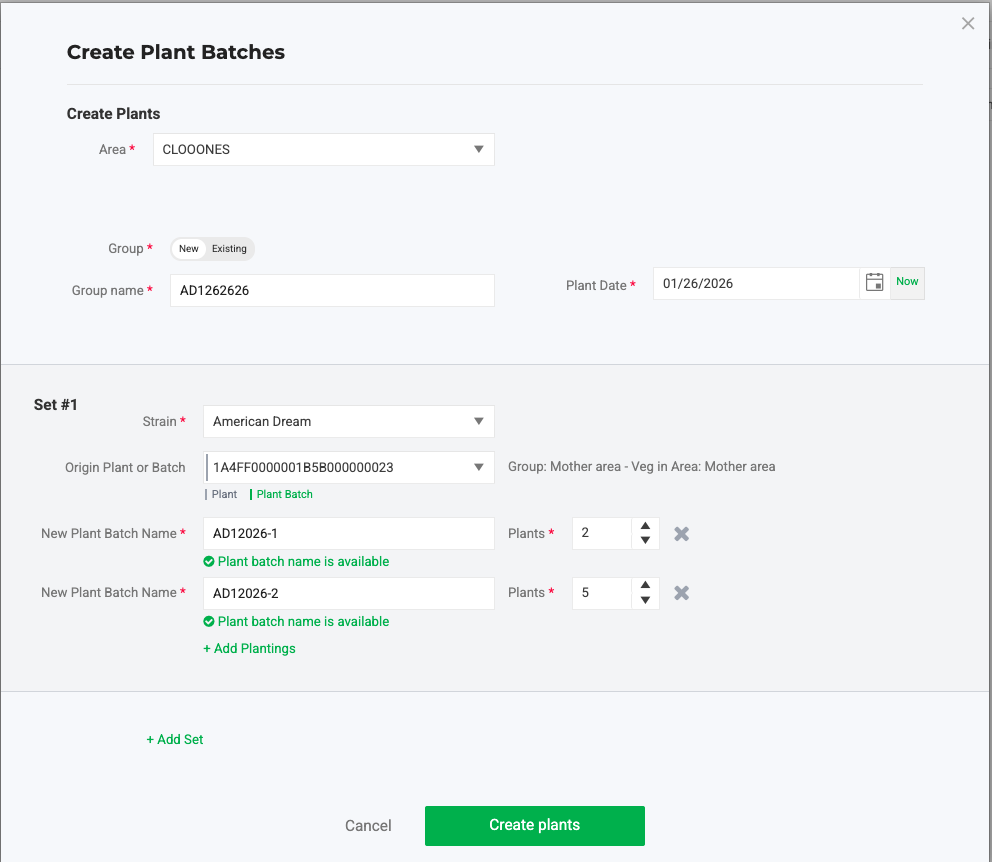
5. Review and Create
- Check every set: strain, origin, tags or names, and plant counts.
- Click Create Plants.
Flourish creates the group, all plant batches, and all plants in one operation, then syncs each batch to Metrc. The new batches appear under Propagation > Immature Plant Groups.
About the Package Tag to Burn
Some states require clones to be cut into a package first, then planted from that package. Flourish does both steps for you: it creates an interim package on the package tag you pick, and immediately plants from it. That package tag is used up, or "burned," in the process and can't be used again.
- The field only appears where your state's Metrc setup requires this interim package.
- It is hidden when the origin is a plant. It can appear when the origin is a plant batch.
- Pick an unused package tag for each plant batch that needs one.
For which states use tags, names, and burned package tags, see Create Plants in Metrc: State Differences.
Fields That Depend on Your State
Flourish reads your facility's Metrc configuration and shows or hides fields to match. You won't see an option your state doesn't allow.
Field or behavior | When you see it |
Plant batches in Origin Plant or Batch | Your state allows cloning a plant batch from another plant batch. |
No origin required | Your state allows opening-balance plant batches, usually for a period after a state launches Metrc. |
Plant Origin Type (Tissue Culture) | Your state allows tissue culture plantings. |
Plant batch Tag vs Name | Tag in states that require plant tags on batches; name everywhere else. |
Package Tag to Burn | Your state requires an interim clone package, and the origin is a plant batch. |
Different strains in one group | Your facility is configured to allow mixed-strain groups. |
Troubleshooting
- A batch shows as out of sync: open its sync status to read the Metrc error. Common causes are a tag already used in Metrc, an area Metrc doesn't recognize, or a plant origin type your state doesn't accept. See Metrc: Get My Clone Batch Back in Sync.
- An option you expect is missing: your state's Metrc setup doesn't allow it. Contact Flourish Support if you believe the configuration is wrong.
Next Steps
- Move plants through the grow cycle: Track Plants Through the Cultivation Lifecycle.
- Back to Creating Plants in Flourish: Overview.
How did we do?
Create Plants in Metrc: State Differences
Create Plants from a Received Clone or Seed Package in Metrc
