Table of Contents
Metrc Retail ID Guide
Metrc's "Retail ID" features generates an each-level identifier for each unit that goes to retail within the state cannabis market. This is similar to Flourish's serial number and COA portal features…
Table of Contents
Metrc's "Retail ID" features generates an each-level identifier for each unit that goes to retail within the state cannabis market. This is similar to Flourish's serial number and COA portal features. Anyone can scan the retail ID, which will display a webpage with information about the product.
Buying Metrc Retail IDs
In New York, you must purchase Metrc Retail IDs directly from Metrc. In other states, Retail IDs are free (as of this time).
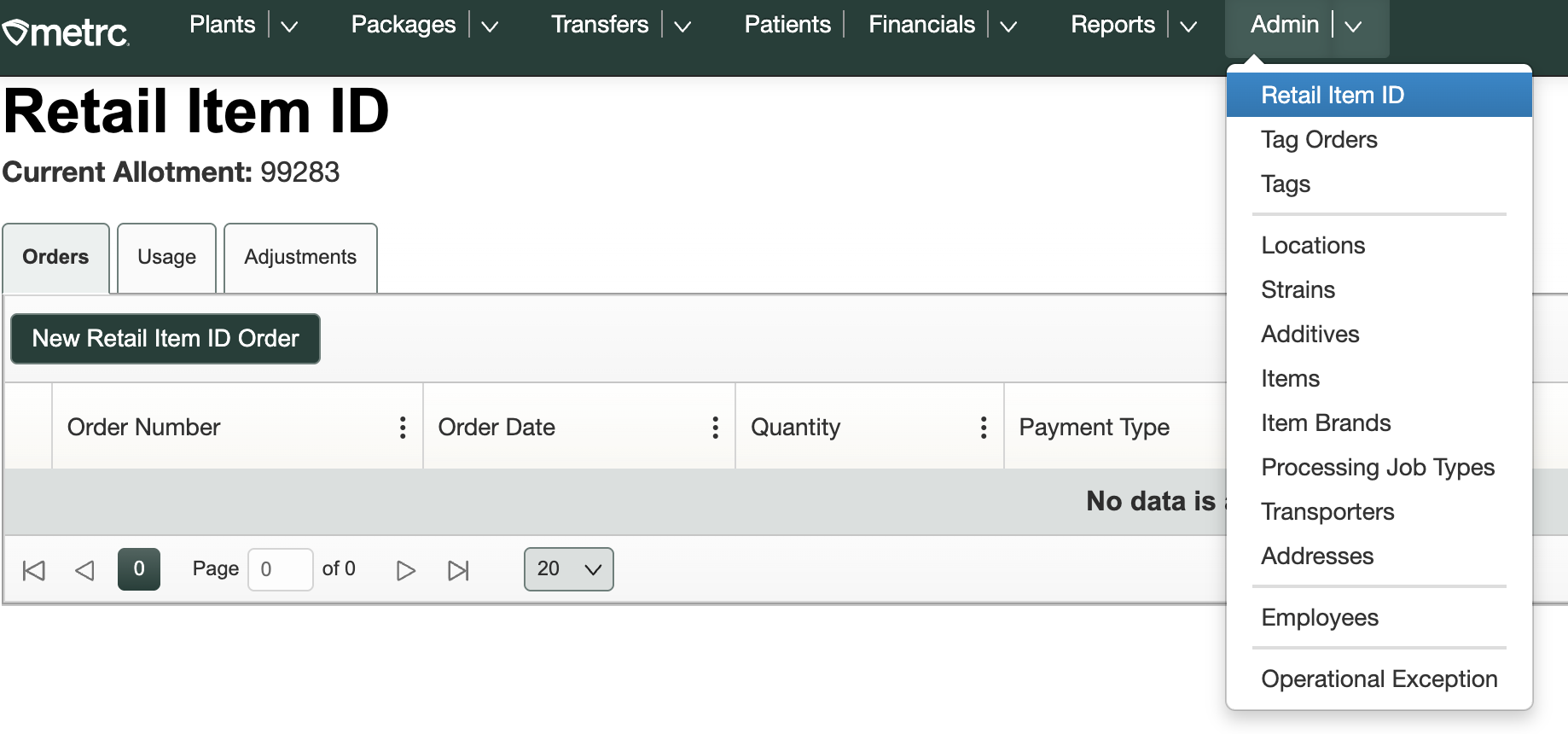
- Log in to the Metrc Portal
- Navigate to the Admin > Retail Item ID
- Click "New Retail Item ID Order"
- Follow the prompts to place the order
Generating Metrc Retail ID
Video Tutorial: Creating and Printing Retail IDs in Metrc (New York)
Generate New York Retail ID
When creating a package where the output item is different from the source item (for example, during a manufacturing run or a package-from-package workflow), the “Finished Good” option cannot be selected at the time the output package is created. In these cases, users should first create the output package, ensure it passes testing, and then mark the package as “Finished Good” after testing is complete.
Use the Finished Goods package attribute to generate the Retail ID.
- Check "Finished Goods" when creating a package (or edit the attaribute after creating).
- Observe that Metrc generates a Retail ID for every "each" or unit within the package
Example: Make 2,000 prerolls. This will generate 2,000 Metrc IDs and cost $200, which is paid directly to Metrc.
To generate a retail ID on a package after it was tested, you have two ways
On Package Creation
Check the "Finished Good" box on the "Confirm New Inventory" screen.
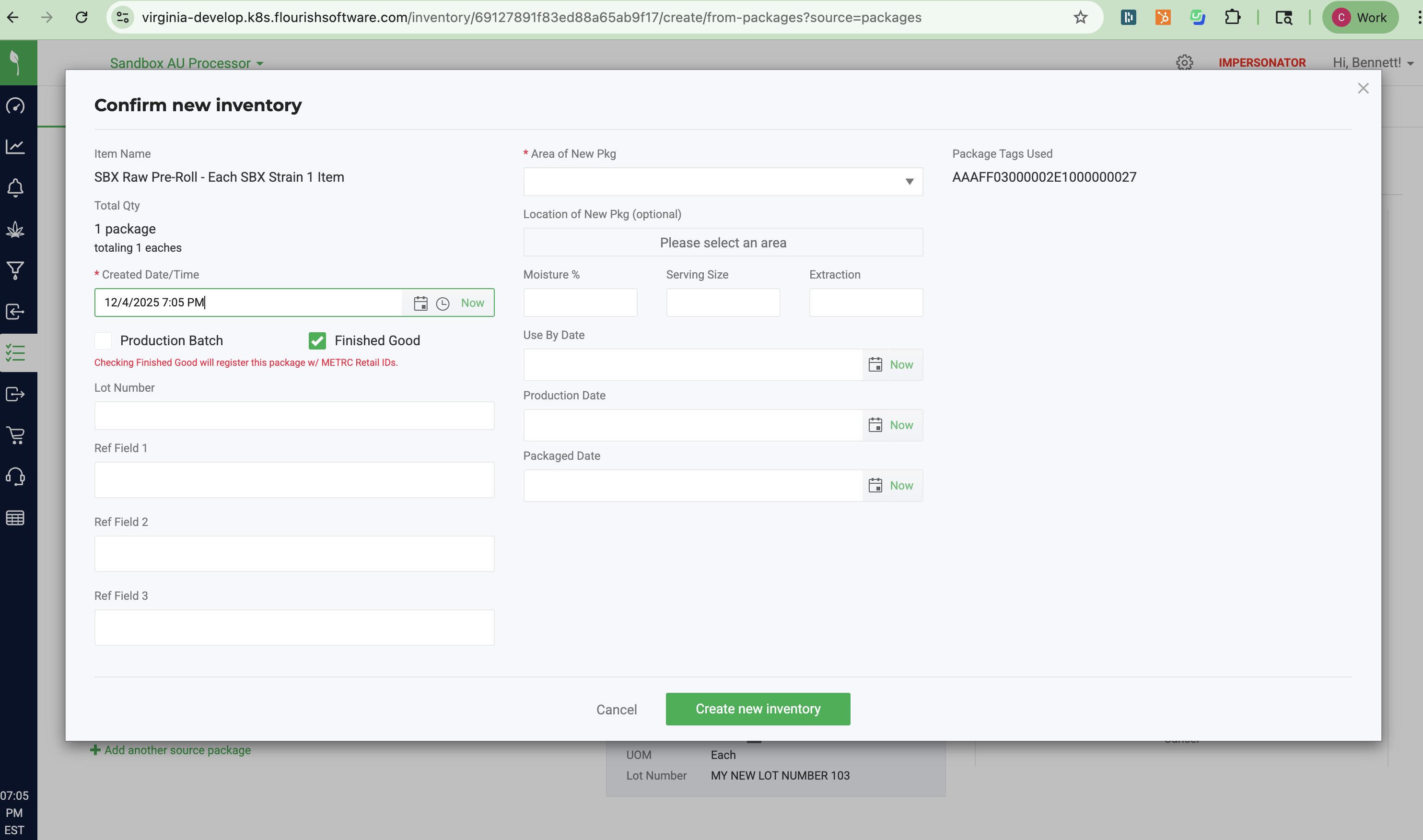
Flourish will display an icon beside the package for any package with Retail IDs generated:

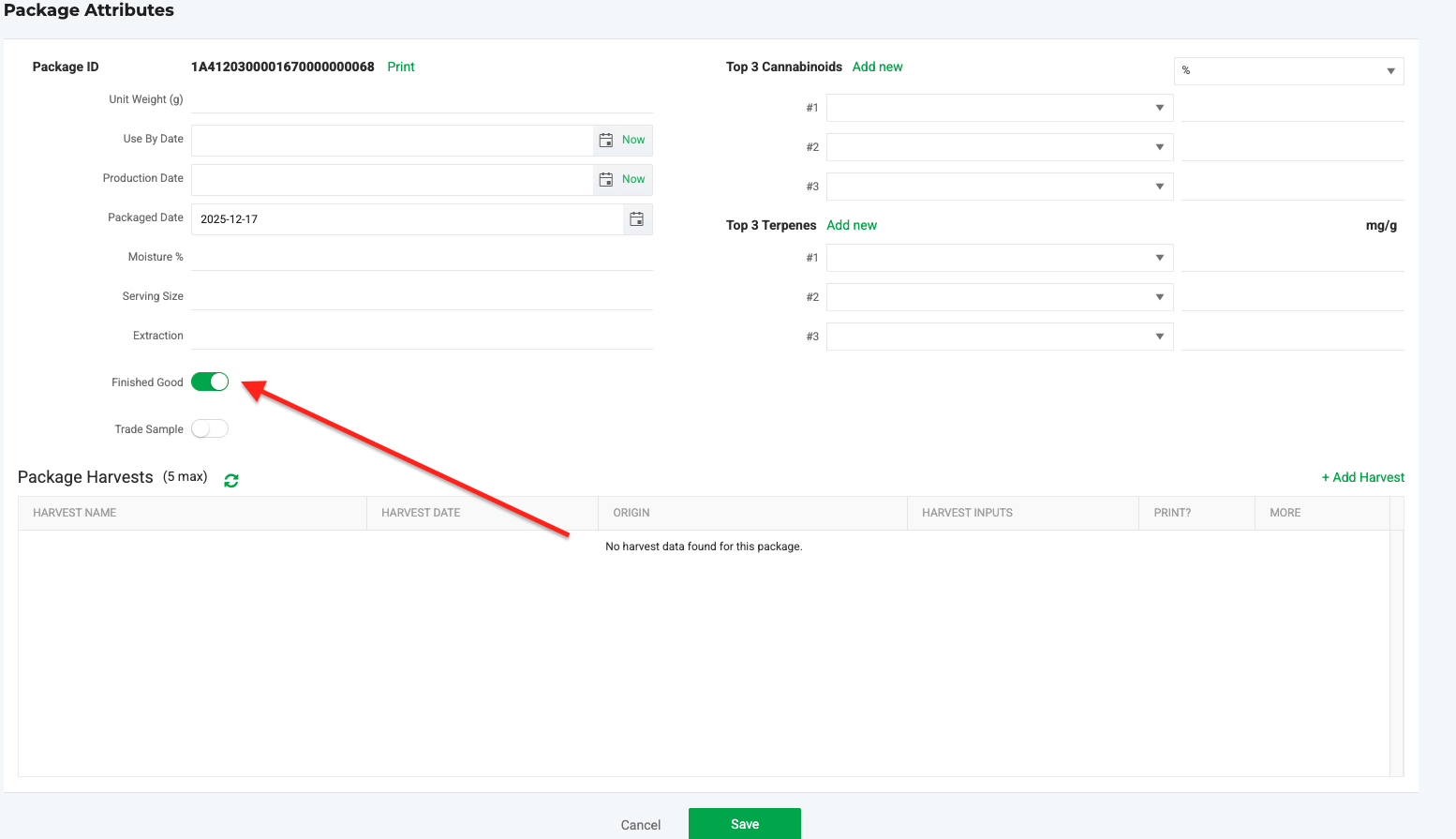
After Package Creation
- Locate the package
- Click Action
- Select Edit attributes
- On the "Package Attributes" screen toggle ON Finished Good
- Click Save.
Retail ID Outside of New York
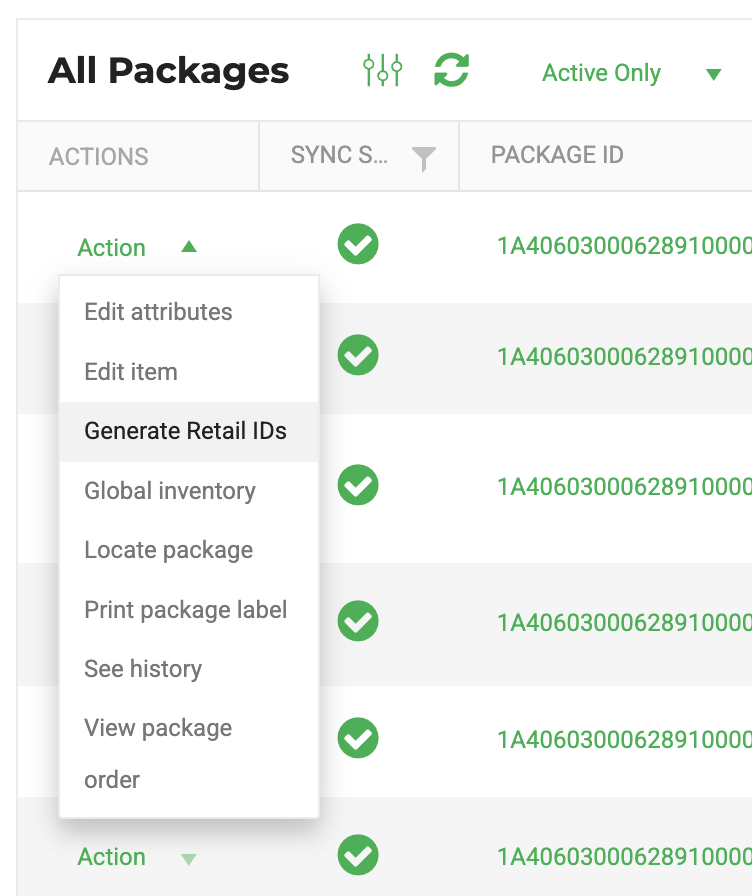
- Select a package that's passed testing. In the action menu, click "Generate Retail IDs"
- This will generate the Retail IDs, and you will see an icon beside the package ID.
- Use Flourish to print Retail IDs using the Action Menu on a package
METRC Retail ID and Package Creation
When creating a package where the output item is different from the source item (for example, during a manufacturing run or a package-from-package workflow), the “Finished Good” option cannot be selected at the time the output package is created.
In these cases, users should first create the output package, ensure it passes testing, and then mark the package as “Finished Good” after testing is complete.
- Make the product
- Test the product
- "Retail ID it by" creating a new package from the current package ID
- Locate the current package ID
- Click Action
- Select Create Package
- Use the same item
- Select the “Finished Good” box when creating the new package.
Printing the Metrc Retail ID
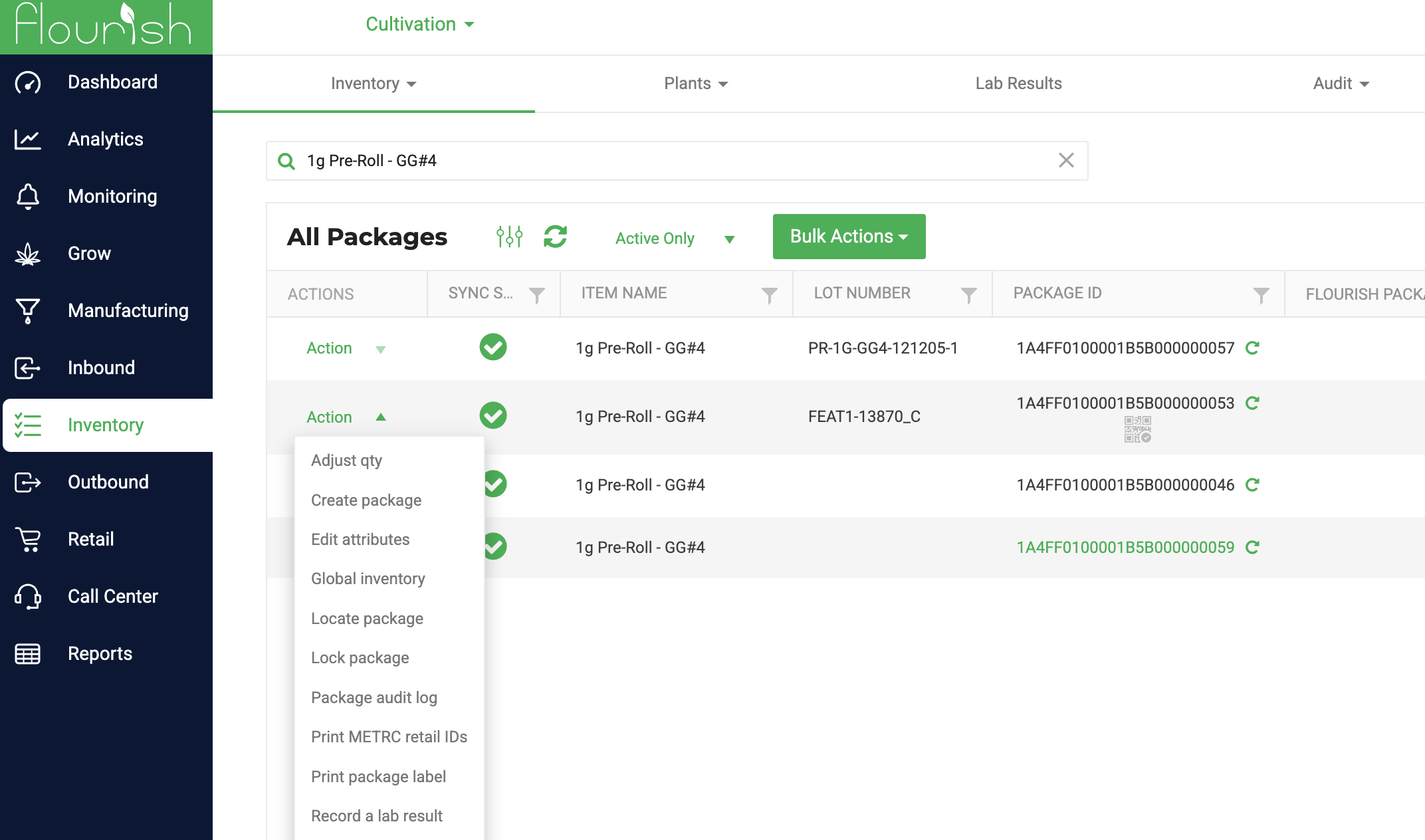
Flourish implemented a dedicated label type for the Metrc Retail ID. This label supports dynamically printing 150+ item, inventory, and testing attributes alongside the Metrc Retail ID. After generating the Retail ID, you will see an icon designating that the package has associated Retail Ids. Find the "Print Metrc Retail IDs" menu in the package action menu:
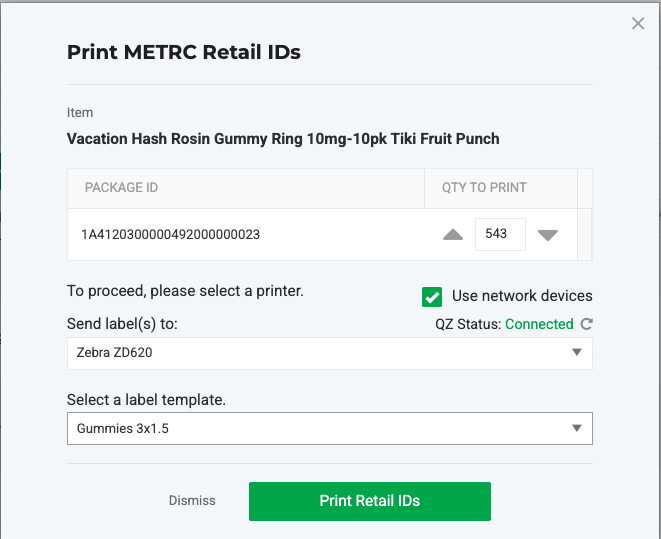
In this example, there are 500 units within the package. You will print 500 labels that contain the unique Metrc Retail IDs. Place these labels on each individual unit.
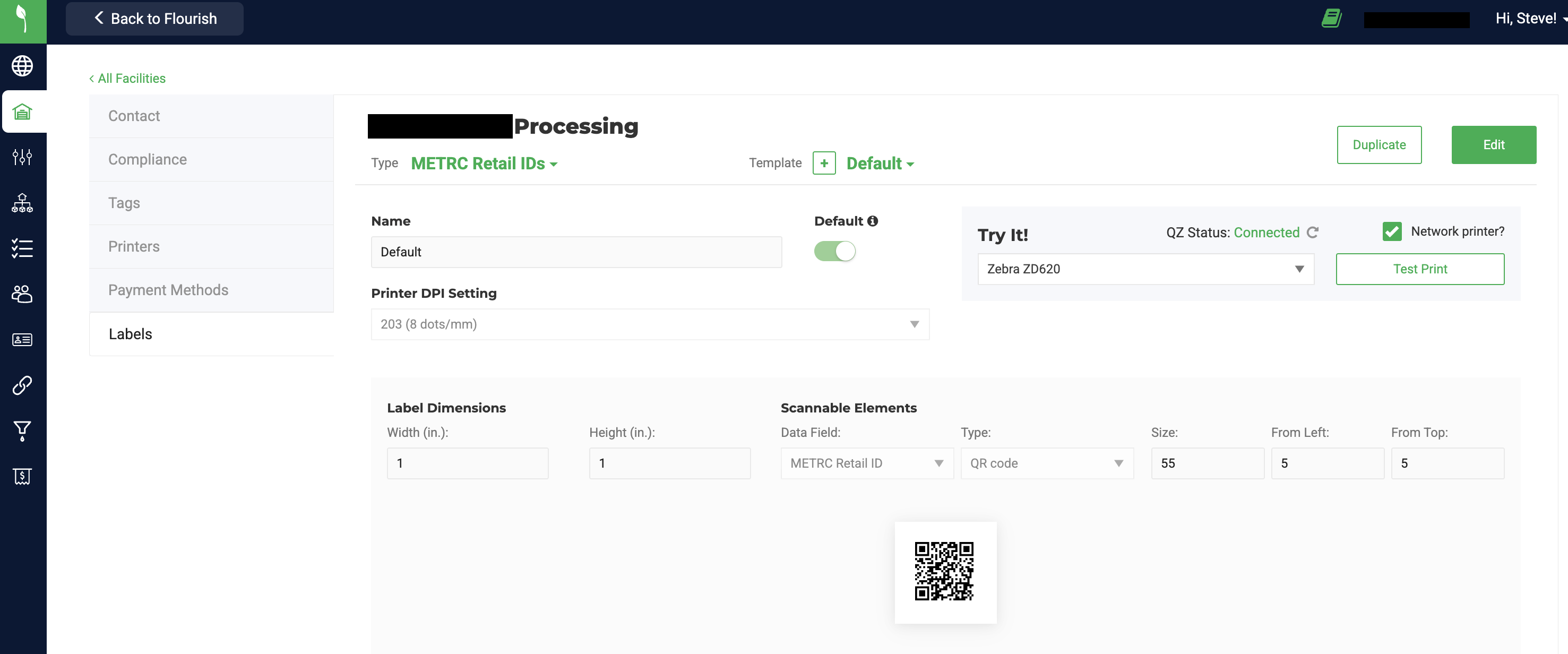
Configure the Metrc Retail ID Label
Navigate to Settings > Facilities > Labels to use Flourish's Label Maker to create label templates with the Retail ID.
This template can be as simple as a QR code or as complex as 40 dynamic data points and static word-wrapped text with multiple scannable elements.
Flourish suppports multiple templates to align with your printing needs.
Use BarTender to Print Metrc Retail IDs
The Retail ID template is available via BarTender. See the BarTender help documentation for more information on this solution.
Exporting the Metrc Retail IDs
Use a report in the Flourish Analytics module to export the retail IDs.
Alternatively, these are also availalable within you Metrc Portal.
Scanning the Retail ID at Point of Sale
Flourish added scanning the Retail ID to our Retail Point of Sale scanning logic for states where the Retail ID is deployed. Simply scan the Retail ID to allocate the unit to the cart.
Troublehsooting Retail IDs
Here are some common issues and resolution paths.
Retail ID not Available to Print - Check Source
Navigate to the Source Package ID where the Retail ID was generated. Sometimes the Retail ID doesn't pass to the "child" package.
Retail ID not Available to Print - Finished Goods Unchecked
Ensure no one unchecked the "Finished Goods" flag. If this is un-checked and saved, it deletes the Retail IDs. You must convert the package to a new tag to regenerate them.
Retail ID "New Finished Good Packages are not allowed because there is not enough Allotment available"
Buy more Retail IDs from Metrc. Note: The Retail IDs are specific to the Metrc license/facility.
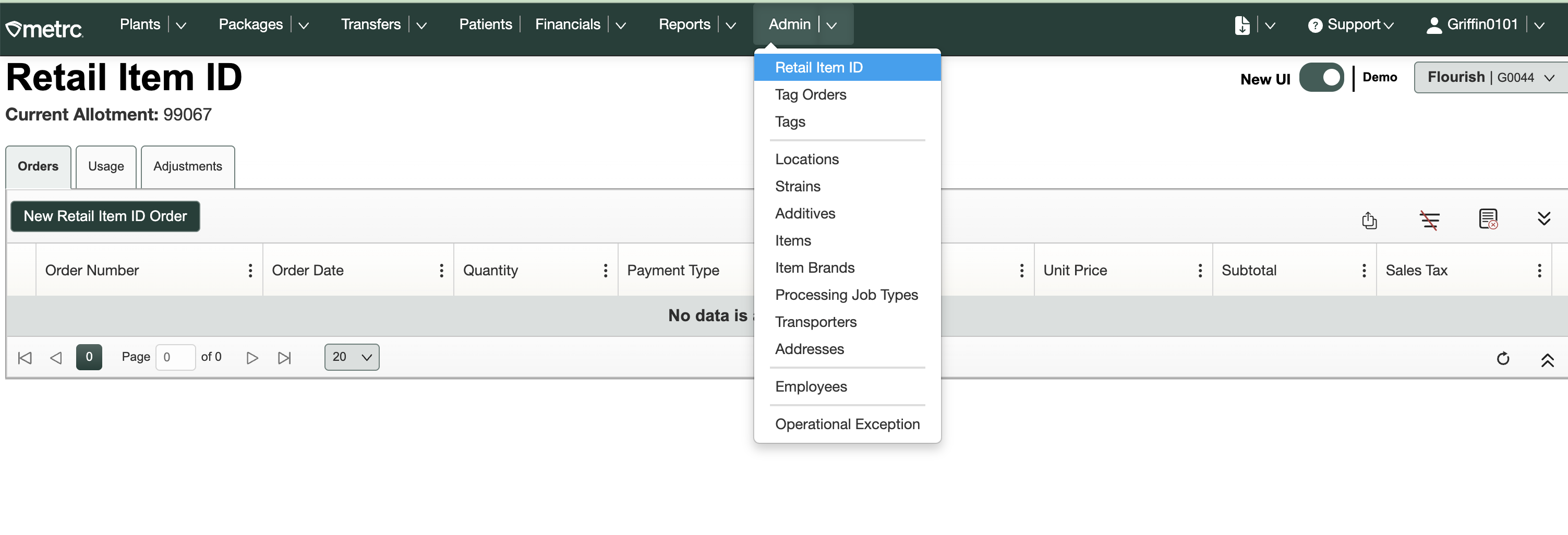
- Select the correct Metrc License. Retail IDs are license-specific
- Navigate to Admin > Retail Item ID
- Note the "Current Allotment" in the screen
Handling External Items in a Distribution License
Purpose
When packages enter a Distribution license in New York with METRC retail IDs already printed, you cannot retag those packages in Flourish. Retagging risks removing METRC-assigned retail IDs from the package record.
Use the Retail Display Name field to display the correct product name on manifests and POS without retagging. Split packages to fulfill partial quantities and sell through inventory as it sits in the system.
Best Practice
1. Sync Packages from METRC
- Select Sync Transfers or Sync METRC Packages.
- Wait for the sync to complete.
- Confirm the packages appear in your inventory.
2. Set a Retail Display Name
The Retail Display Name controls how the product name appears on manifests and in POS. It does not replace or remove the METRC retail ID on the physical package.
The Retail Display Name must be unique from any existing internal item names in the system.
- Navigate to Settings.
- Select Inventory.
- Select External.
- Locate the item associated with the received package.
- Click the item to open the item record.
- Enter the desired product name in the Retail Display Name field.
- Click Save.
3. Split and Sell Through Inventory
How did we do?
Configure Metrc User Permissions for Flourish Sync
