Move a Harvest Back from Drying to Harvest (Non-Metrc)
Move a non-Metrc harvest from the Drying stage back to the Harvest stage. Required before a drying harvest can be moved back to Flowering.
Purpose
If you moved a harvest to Drying too early, you can move it back to the Harvest stage. This is also the first step if you need to send a drying harvest all the way back to Flowering, since a harvest can't go from Drying straight to Flowering.
This action is available for non-Metrc facilities only. Dry weights are not removed, so if they were recorded in error, set the values to zero.
Move a Harvest Back to the Harvest Stage
- Select Grow from the left navigation.
- Click Drying in the top ribbon and select Drying Harvests.
- Click the name of the harvest you want to move back.
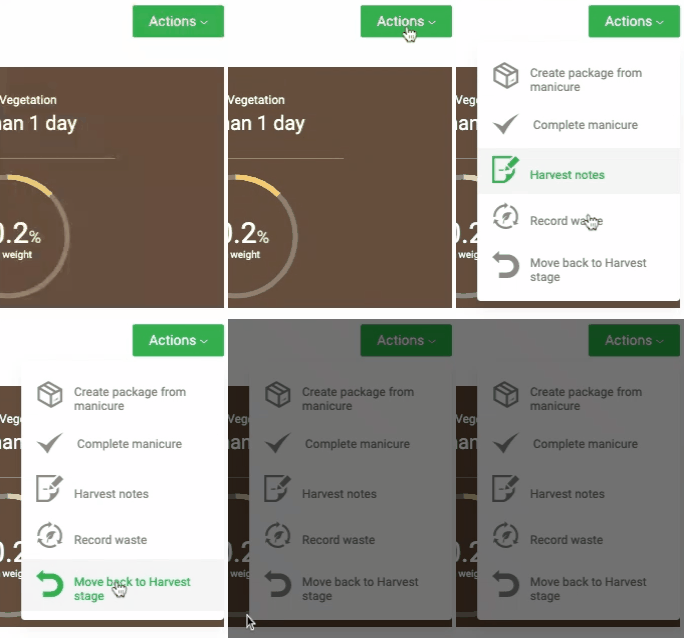
- Click Actions and select Move back to Harvest stage.
- Click Proceed to confirm, or Cancel to keep the harvest in Drying.
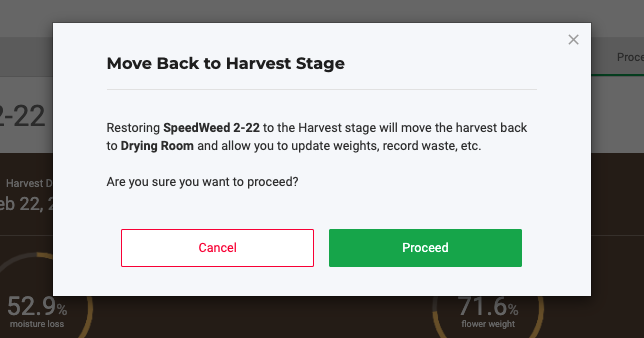
The harvest returns to the Harvest stage, in the area it was in before you moved it to Drying.
[VERIFY: what happens to dry weights or packages already created in Drying]
Next Steps
- To send strains back to Flowering, see Move a Harvest Back to Flowering.
How did we do?
Create Inventory Packages from a Harvest
Complete or Reopen a Harvest
