Generate a new PIN
Generate a New PIN. Purpose. A PIN lets a user log in to the Flourish mobile app or the Point of Sale (POS) software. Each user needs a PIN before they can log in to either app. Generate a New PIN. C…
Generate a New PIN
Purpose
A PIN lets a user log in to the Flourish mobile app or the Point of Sale (POS) software. Each user needs a PIN before they can log in to either app.
Generate a New PIN
- Click Manage Settings. This is the gear icon.
- Click Users.
- Select the user. Click the user's username (email address), or click on Actions to select Edit User.
- Click Edit.
- Click Generate New PIN.
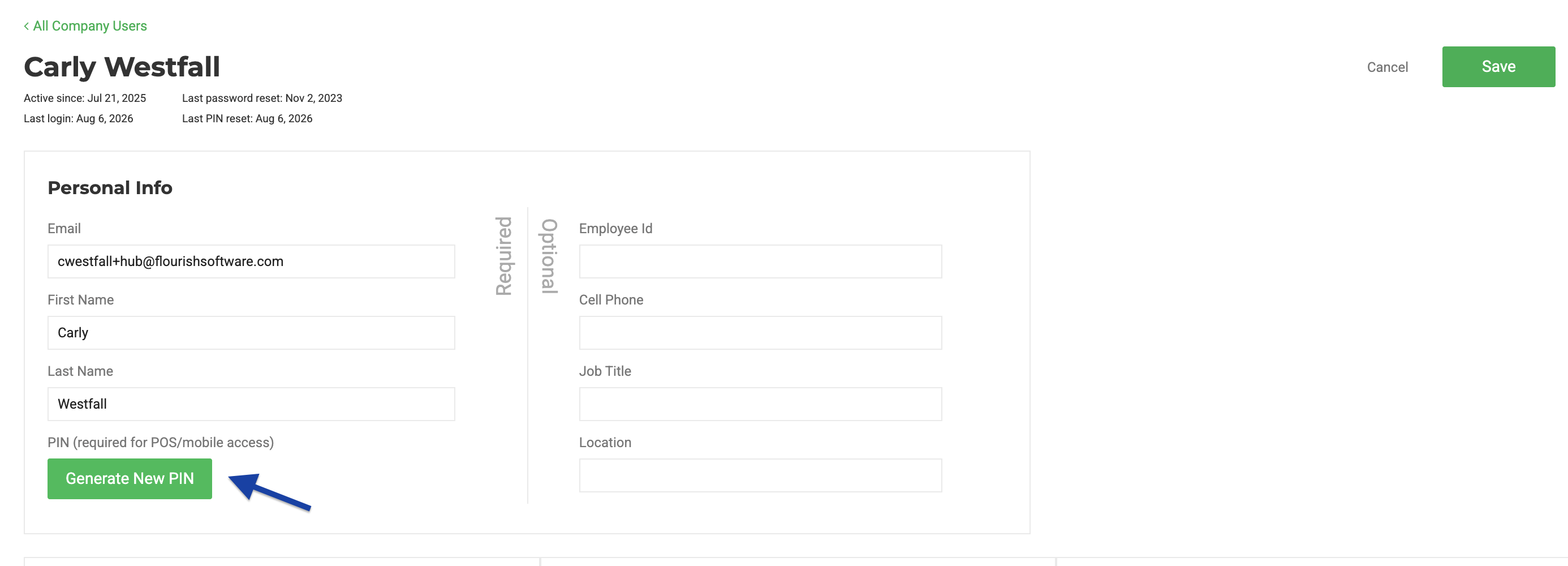
Flourish will send the user an email with the new PIN, but it is best practice to write it down and keep it somewhere safe.
Reset a PIN
Repeat the steps above to reset an existing PIN. The new PIN replaces the old one, and the user must use the new PIN to log in going forward.
How did we do?
User Roles and Facility Permissions
