Troubleshoot: Item Missing When Creating a Harvest Package
Troubleshoot a missing item in the harvest package selector: check the Same Strain checkbox, the item's Metrc sync for the package strain, and facility settings.
Use these checks when you create a package from a harvest and the item you want does not appear in the Select an item list.
Before You Start
Confirm the facility and harvest you are working with. Item eligibility and Metrc sync status are evaluated for the selected facility, not across the entire company.
If you cannot view or change items, ask a Flourish administrator at your organization to help.
What to Check
1. Check the Same Strain checkbox
Same Strain, under the Item field, is checked by default. While it is checked, the list only shows items with the strain you selected under Package Source, plus items with no strain.
- If the item has a different strain, uncheck Same Strain. The list then shows items regardless of strain. Weight is still drawn from the harvest strain you selected, and the new package carries the item's strain.
- If the item should have the same strain, open it and compare its strain with the harvest strain. Strains with the same or similar names can be separate records. Ask an administrator to confirm the item and harvest use the same strain record.
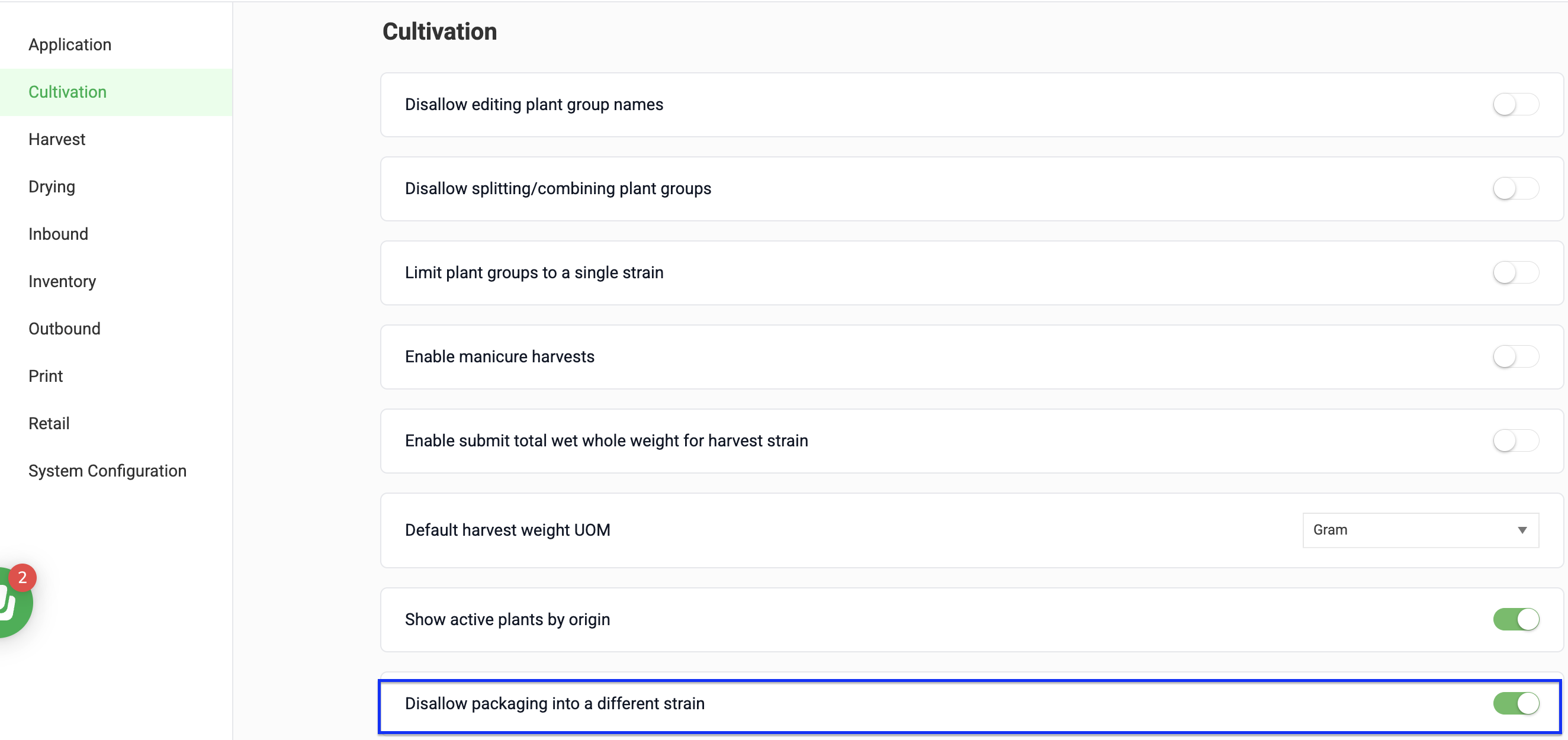
If you don't see the Same Strain checkbox, your facility has Disallow packaging into a different strain turned on. An administrator can turn it off in Settings > Configurations: select the facility, click Cultivation, and turn the setting OFF.
2. For Metrc facilities, check the item in Metrc
At Metrc facilities, the list only shows items that exist in Metrc for the strain the new package will carry:
- An item with its own strain needs to be synced to Metrc for this facility.
- An item with no strain takes the harvest strain, so Metrc needs a version of that item for the harvest strain. If Metrc only has the item for other strains, it won't appear for this harvest.
Item sync status is tracked separately for each facility license. An item can be In Sync at one facility and Out of Sync or Not Synced at another. To check it:
- Go to Settings > Inventory and open the item.
- Select State Eligibility.
- Open the facility list and locate the facility where you are creating the package.
- If the item is Out of Sync, view the sync detail and correct the validation error.
- Select Sync Now! to retry the sync.
If the retry fails with a generic message that does not identify a correction, contact Flourish Support. Include the item name, facility, and a screenshot of the facility sync-status details.
3. Confirm the facility can package from this stage
- Go to Settings > Configurations.
- Select the facility where you are creating the package.
- Open the Harvest or Drying section, whichever stage the harvest is in.
- Confirm that Create packages from stage is turned on.
- Confirm the weight bucket you want to package from is turned on.
With Draw down from harvest, the harvest also needs weight recorded in that bucket. With Declare & add up, no weight needs to be recorded first.
Expected Result
Once the Same Strain setting, Metrc item, and facility configuration are correct for the selected facility, the item appears in the harvest package selector.
How did we do?
Complete or Reopen a Harvest
